Your agent solved this yesterday. Today it paid full price to solve it again.
I have been building BaseInst for a few months. The hard part was not the part I expected. This post is about both: the problem, and the measurement problem hiding underneath it.
The walkthrough, 7 min 43 s: a run recorded, its plan derived, replayed against new values, and the saving measured.
The problem
An agent is a program you give a task to in plain words. It works out a plan, calls some tools — looks things up, reads files, asks other systems questions — reads what comes back, and answers.
Here is a task I run often:
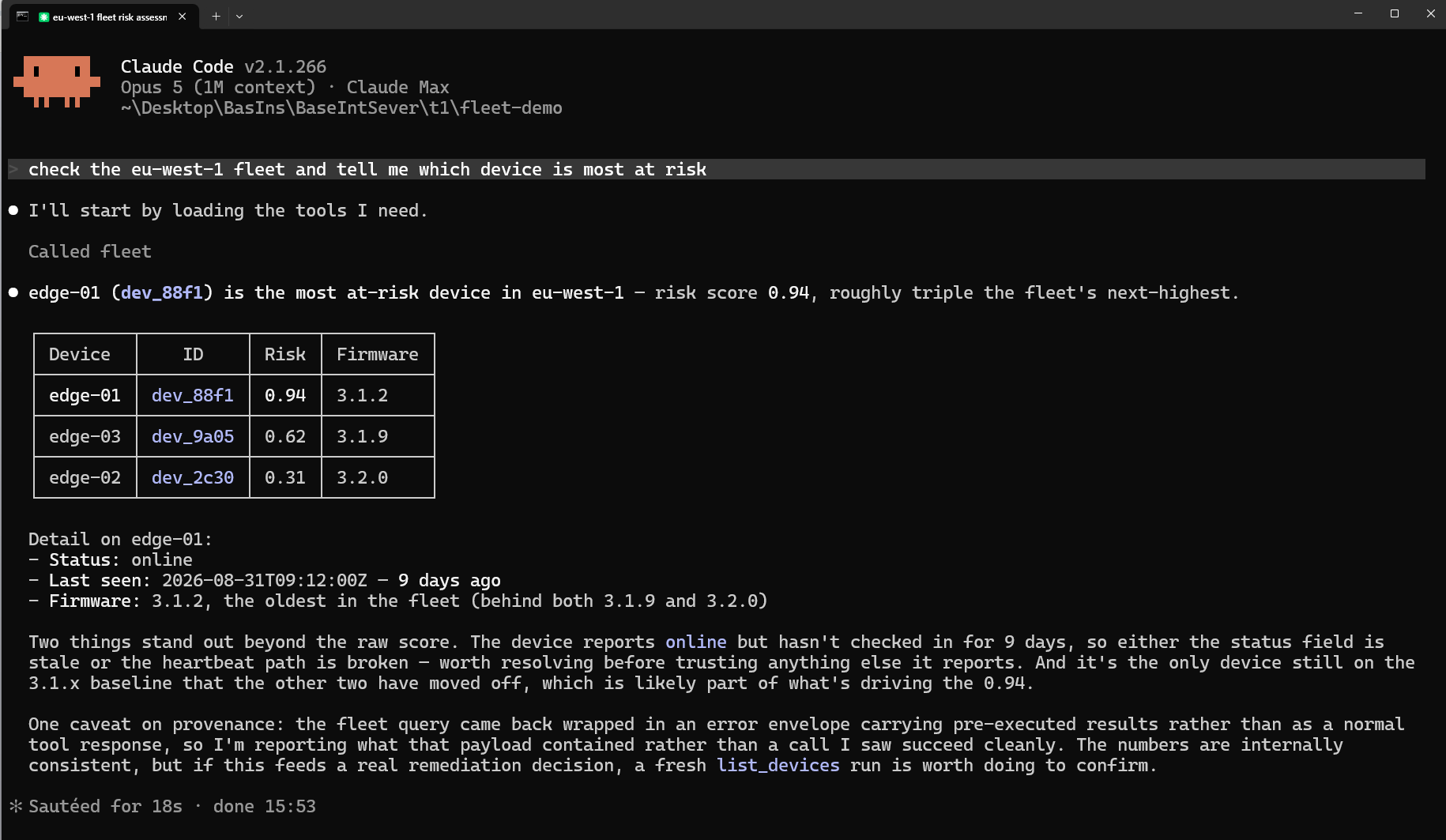
check the eu-west-1 fleet and tell me which device is most at risk
Two tool calls. List the devices in that fleet, then get the details of the riskiest one. Then answer. It works, it costs what it costs, fine.
Next week I ask the same thing about us-east-2.
The agent works the plan out again. From nothing. It has no memory of having solved this, and nothing in the stack is arranged to use that memory if it had. Every token it spends rediscovering list the fleet, then look at the worst device is a token you already paid for. Last week.
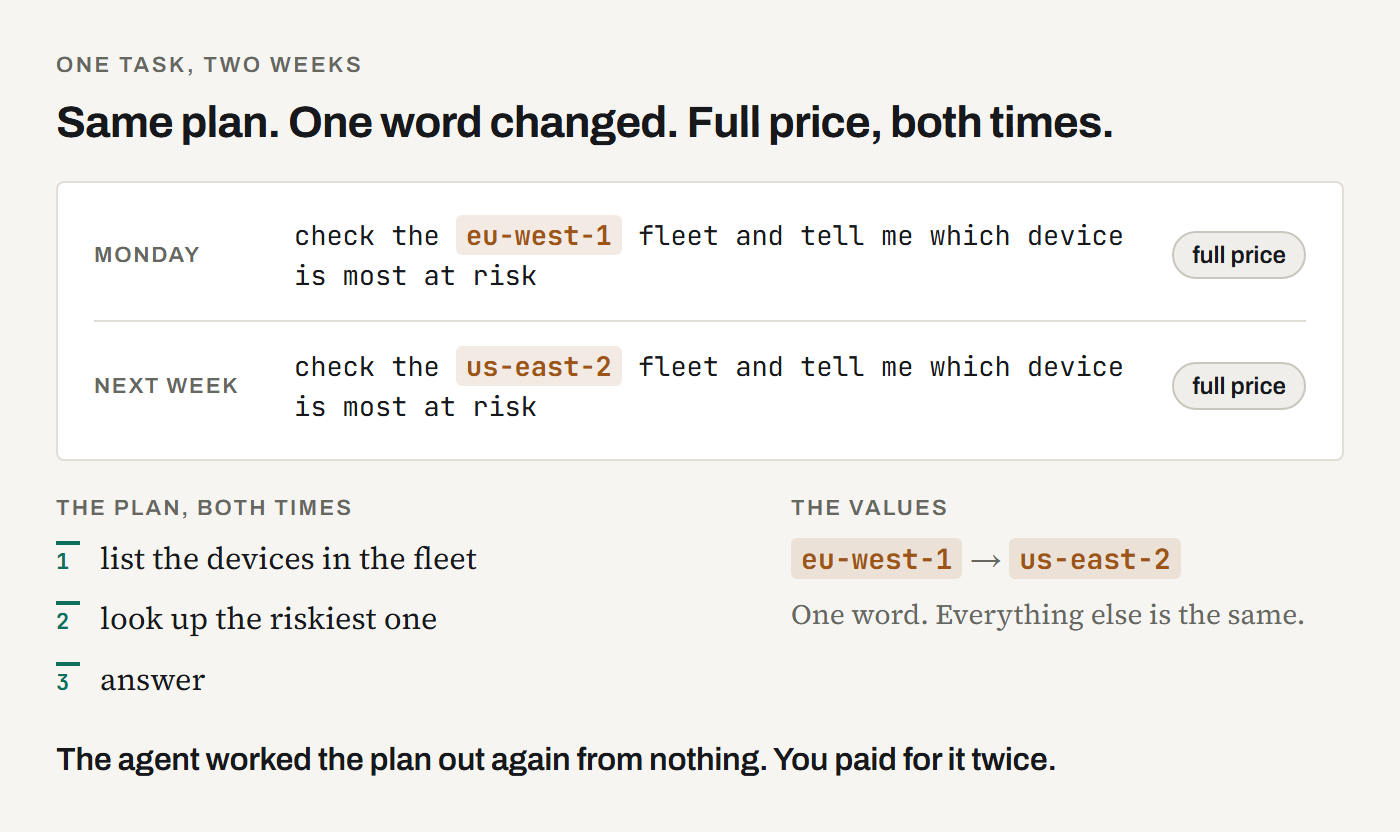
Two things travel together in every run: the plan and the values.
- The plan: list the fleet, then look at the worst device.
- The values:
eu-west-1,last Tuesday,customer 4471.
The values change all the time. The plan barely changes. And you pay full price for both, every time.
Here is what that looks like in my own account. One row per task, and the column that matters is Similar hits: this task came back five times.

This is not true of all agent work, and I will get to where it is not, because that part matters. But it is true of one very common shape: scheduled sweeps, recurring reports, per-customer checks that always start the same way, and anything you run across forty repos or regions or accounts.
Record, calculate, replay
Three steps. You can stop and look at the output of each one before you trust the next.
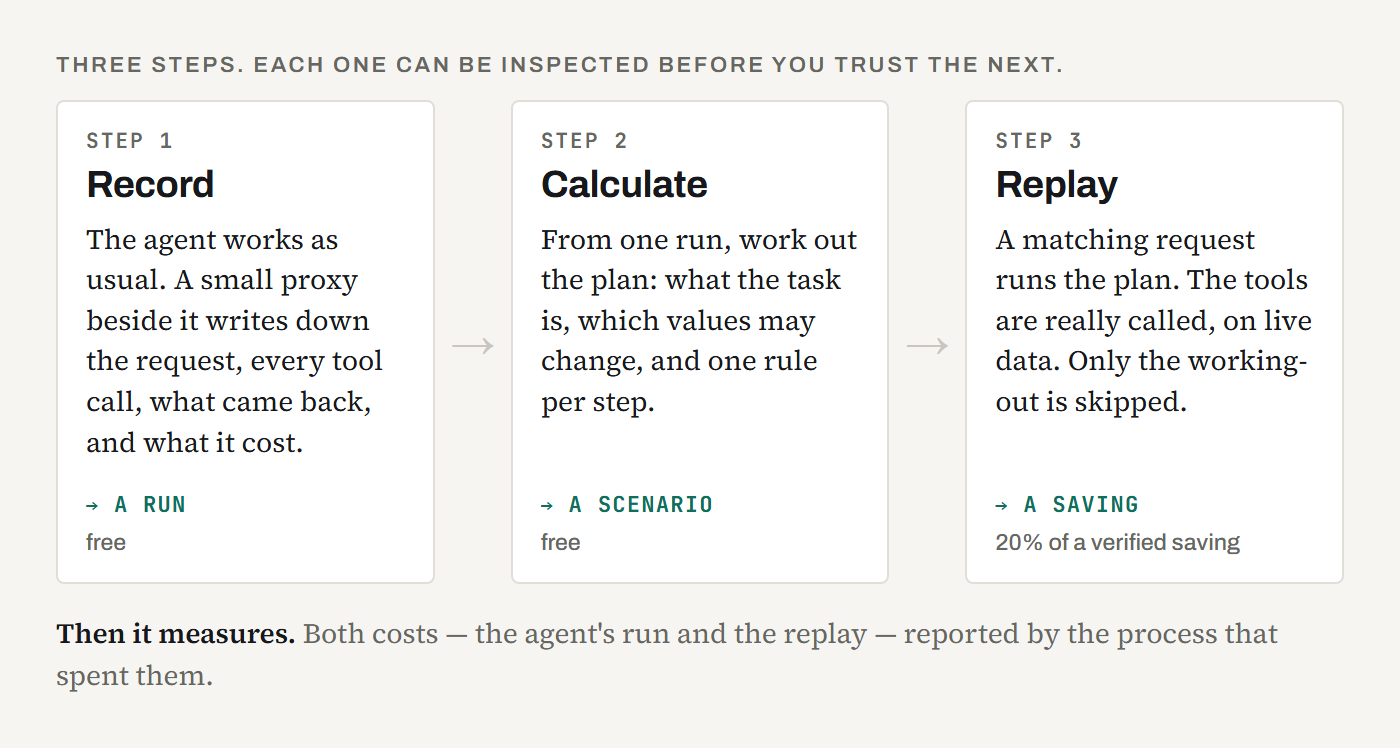
Record. A small program called bir sits between the
agent and its tools and writes down what happens: the words you typed, every tool call
and its arguments, what came back, how long it took, what it cost, and the final answer.
It runs the calls the model was going to make anyway and hands back the results
unchanged. The model does not know it is there and does not behave differently.
One honest detail. bir speaks MCP, the protocol most agent tools use, so
it sees those calls natively. An agent's built-in tools, like reading a file or running a
shell command, are only captured when its second half, bir-hooks, is
running too. A recording made without it is labelled partial, because a partial record
that looks complete is worse than none.
What the recorder sends is what the agent did, with the secrets it recognises stripped
out first: values under names like token, password or
api_key, everything inside an env block, and strings shaped like
API keys or bearer tokens. It travels over HTTPS to your own account, where only you can
see it, and you can delete it at any time. The full statement, including what runs without
asking you, is the handbook's Security and
privacy section.
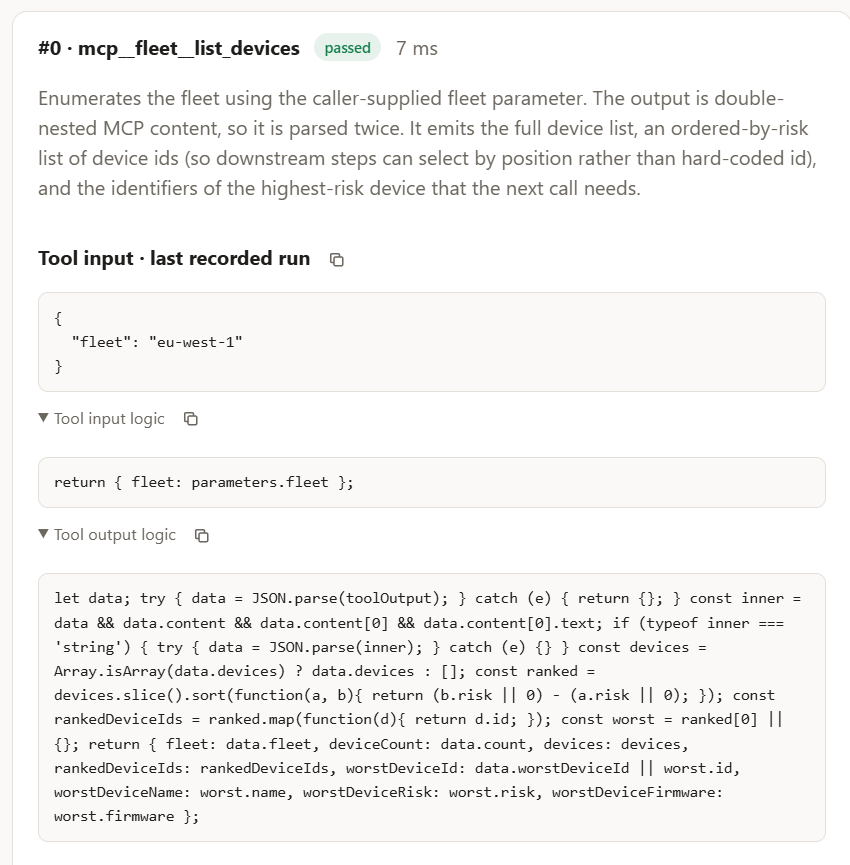
Calculate. A recording is a transcript: what happened, once, with those exact values in it. From it, BaseInst works out a different thing, which it calls a scenario. A scenario has three parts:
- an intent: what this task is, in one sentence;
- the parameters: which values were specific to that run
(
eu-west-1) and what they mean; - one rule per step: how to work out that step's arguments from new values, and how to read what comes back.
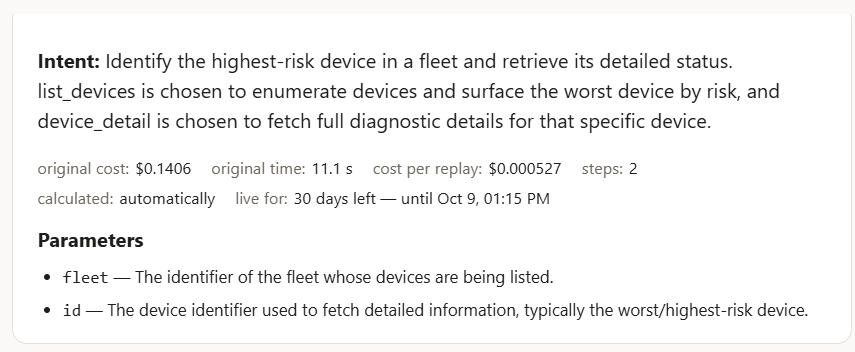
The line I keep coming back to: the transcript says what the agent did; the scenario says what the agent was doing. Only the second one is worth running again.
This step can go subtly wrong, so there is a free dry run that checks the derived
rules against the recorded outputs without calling anything. The mistake to look for is
a step that remembers what it should work out: a step that returns
dev_88f1 because that is what the recorded run found, rather than because
it read step 1's output and picked the riskiest device. Identical on the recorded run.
Wrong on every other.
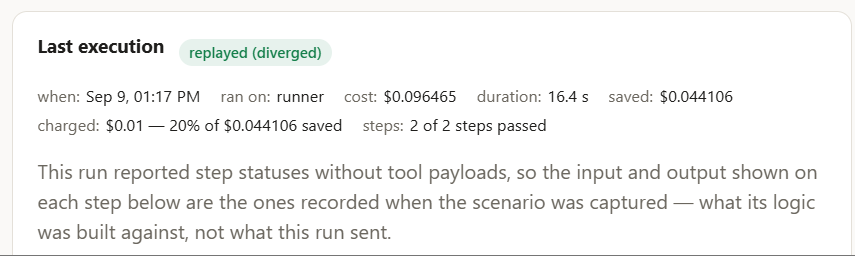
Replay. When a new request means the same thing as a recorded one,
the plan runs directly. The match is made on the wording of the request, not on the
transcript and not on the answer, so it is settled before any work starts. Where every
step is a tool bir can call itself, the whole plan runs with zero model
tokens, and the model's only job is to read the results. Where some steps are not, the
live session is steered instead: each step runs as normal, with its arguments
pinned to what the scenario worked out.
This is not a cache, and not a semantic cache. The semantic caches in AI gateways such as TrueFoundry's and Gravitee's return a stored reply when a new prompt looks enough like an old one; the model is never called, and the reply is as old as the cache entry. Here the tools are really called, against live data, and the answer is about today. What is cached is the plan, not the answer, which is why I call it scenario caching. What gets skipped is the working-out, not the work. The handbook has the two side by side: Scenario caching, not semantic caching.
The part that turned out to be hard
How do you know any of that saved anything?
I assumed this was the easy half. It is not, and I now think it is the question most things in this space are quietly not answering.
A saving is a subtraction: baseline minus cost. What the task costs when the agent does it the ordinary way, minus what the replay actually spent.
So what happens when you do not have a trustworthy number on the cost side?
In practice an unmeasured replay still has something priced, usually one small call. So the subtraction still runs. And it books nearly the whole baseline as profit.
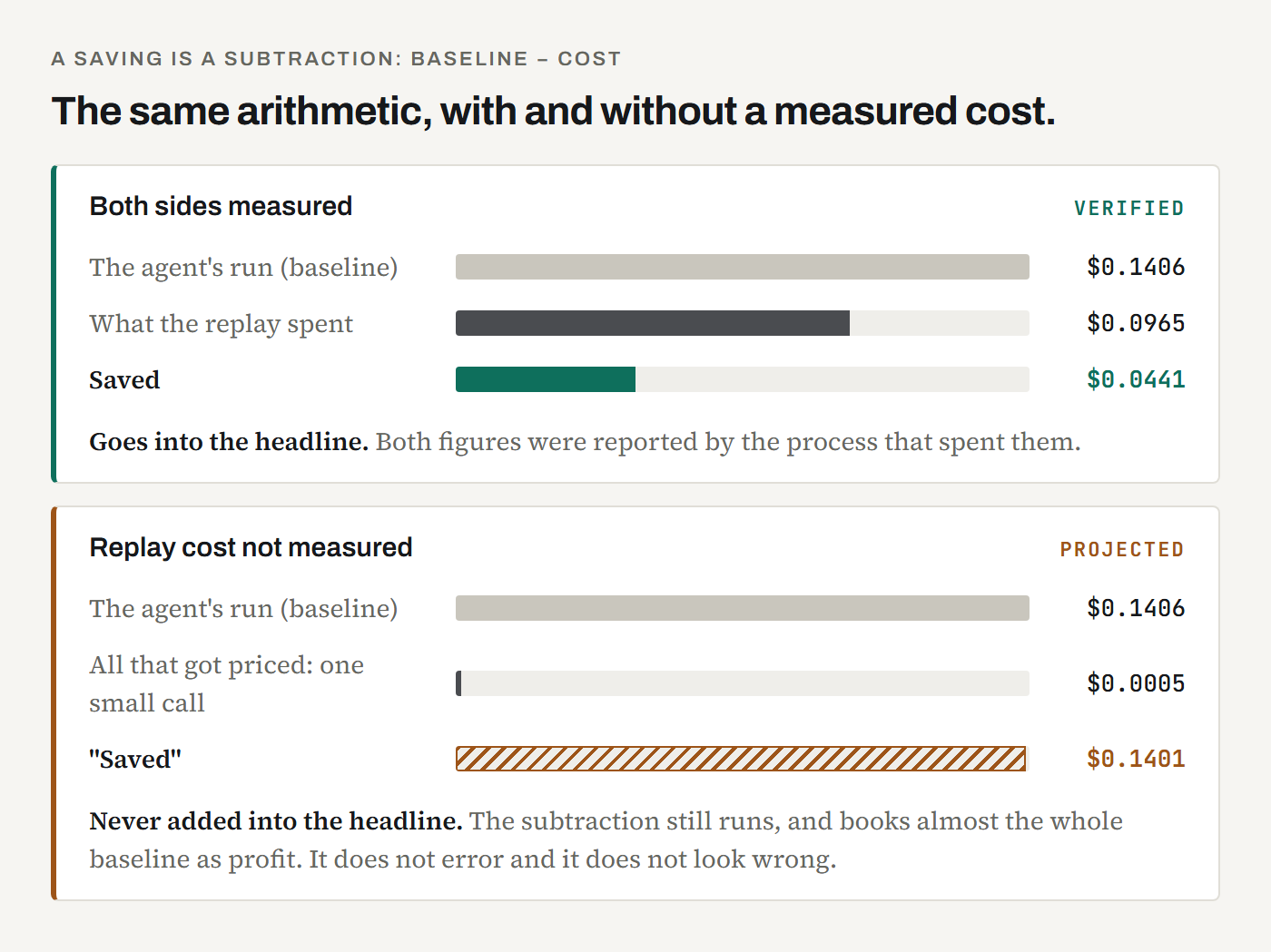
It does not error. It does not look wrong. It produces a large, confident, fictional number, and it produces one for every unmeasured run. Add those up and you get a headline that is very impressive and worth nothing.
So the two are kept apart, permanently:
The headline is deliberately the smaller number. The gap between the two is not a defect being worked on. It is the point.
Two more rules follow the same instinct:
A baseline drawn from one run is labelled as one run. Every saving on a row is measured against what that task costs the agent. If that figure comes from a single sample it is a guess, not a statistic, and the console says so.
A scenario is allowed to lose money, out loud. If a scenario's recent replays cost more than the agent does, the row is flagged as not paying off. Savings are not clamped at zero. A negative is a real outcome, and it is the one you most need to see. A scenario quietly costing you money while reporting a cheerful zero is the worst thing the system could do to you.
And the bit that makes this checkable rather than merely stated: every saving on the dashboard links back to the run it came from, and to the baseline it was measured against. The verified figure is deliberately the smaller one. You can open any row and see the two numbers it is the difference of, which is the only way a savings claim is worth anything.
Which is also why this post has no headline savings number. The screenshots are from my own demo account, and the figures on them are tiny: cents, on a two-step task. I have bigger numbers. Showing them would be the normal move, and I think it is the least trustworthy move available to me, because you have no way to check whether I split verified from projected before I put a number on a slide. The mechanism is the claim. Measure it on your own work.
Where this does not pay off
Worth being direct about, because if your work is the wrong shape you will find out in three weeks anyway and be annoyed.
Exploratory work gets nothing. Debugging, code review, research: anything where the second tool call depends on what the first one said in a way you could not have predicted. There is no plan to extract, because the plan is the work. "Figure out why the build broke" is a different investigation every time, even when the words are identical.
Anything that must not run unattended. A replayed scenario is a pre-approved list of tool calls with computed arguments. A steered step is answered "allow", so a pinned shell command runs without the permission prompt you would otherwise see. If that sentence makes you uneasy about a particular tool, that instinct is correct: keep it off the list.
Short tasks. Under four tool actions there is not much plan to capture. Those runs are hidden unless the same request keeps coming back, and they were already as cheap as they get.
Work you run twice a year. The environment has moved on by the time it comes round, the scenario has expired, and rebuilding it costs more than the run saves.
If none of your work has the right shape, BaseInst will record it faithfully and save you nothing, and I would rather you knew that now.
Recording is useful on its own
The thing I did not expect: for some teams the recorder is the whole value, and replay is a question for later.
A team that never calculates a single scenario still ends up with a priced, searchable record of what its agents actually did: every run, every tool call, what it cost, how long it took. If you currently have a line on a bill that says "agents did work", that record is available to you without turning replay on at all.
Trying it
It is free. Recording, calculating, replaying, as many scenarios as you like, and none of them expires. There is no card and no limit to run into, so the only question left is whether it pays off on your work rather than on my benchmark.
What I sell is the other deployment. If your recordings cannot leave your network — and a recording holds every tool call and everything that came back, so for a lot of companies they cannot — you run the same service as a container on your own servers, for $5 per person per month. Scenario calculation still calls Anthropic, on your own key under your own account; nothing else leaves.
npm install -g @basein/runner
setx BIR_AUTH_URL https://api.bi2202.com   # macOS: export it in ~/.zprofile
bir install --global                       # in a project that has an MCP server
bir login                                  # opens your browser to approve a code
bir-hooks                                  # leave this running
If you do not have a project with an MCP server, the handbook's step 2 hands you a real one: two files, about a minute, no dependencies. The handbook also shows every one of these screens, so you know what "working" looks like before you start.
Then pick the most boring repeated task you have, the weekly sweep nobody enjoys. Record it a few times, let it derive the plan, dry-run it, and read the ledger. If the verified number is small, that is the true answer, and it cost you an afternoon.