What is Basic2202?
An agent given a task works out a plan, calls tools, reads what comes back, and answers. Give it the same task tomorrow with one value changed — a different region, a different customer, a different week — and it works the same plan out again from nothing.
The tokens, the latency and the tool calls are all spent a second time to arrive at a conclusion the first run already reached. Basic2202 records those runs, derives the plan from one of them, and runs the plan directly the next time the same question comes round.
The loop
Three steps. Each is a thing you can see in the console, and each can be inspected before you trust the next.
The agent works normally. Every tool call, its arguments, what came back, how long it took and what it cost is stored — along with the prompt that started it and the answer it reached.
Produces · a runThe transcript becomes logic: an intent, a parameter schema naming what was incidental to that particular run, and one body per step that recomputes that step's arguments.
Produces · a scenarioA prompt that means the same thing as a recorded one runs the logic instead of being solved again. The tools are really called; only the rediscovery is skipped.
Produces · a savingRecord
The runner sits in the agent's execution path and stores each run. Nothing
about the model's behaviour changes — the recorder executes the calls the
model was going to make anyway and returns the results unaltered. The one
thing the model can see is a reserved property, __bir_call_id__
(Reserved. Leave unset.), that every wrapped tool's input schema
declares so that a call id can ride along; it is stripped before the server
sees a call.
A run with three tool actions or fewer is not listed as a recording, and is eventually pruned. It is still matched, though: repeat its prompt and the repeat lands as a hit on it, and one hit lists it however short it is. Below that threshold there is no plan to derive, only a single call and its answer. Each finished run gets a title of at most 40 characters, written by a model from its transcript, so the list reads as a list of tasks rather than a list of ids.
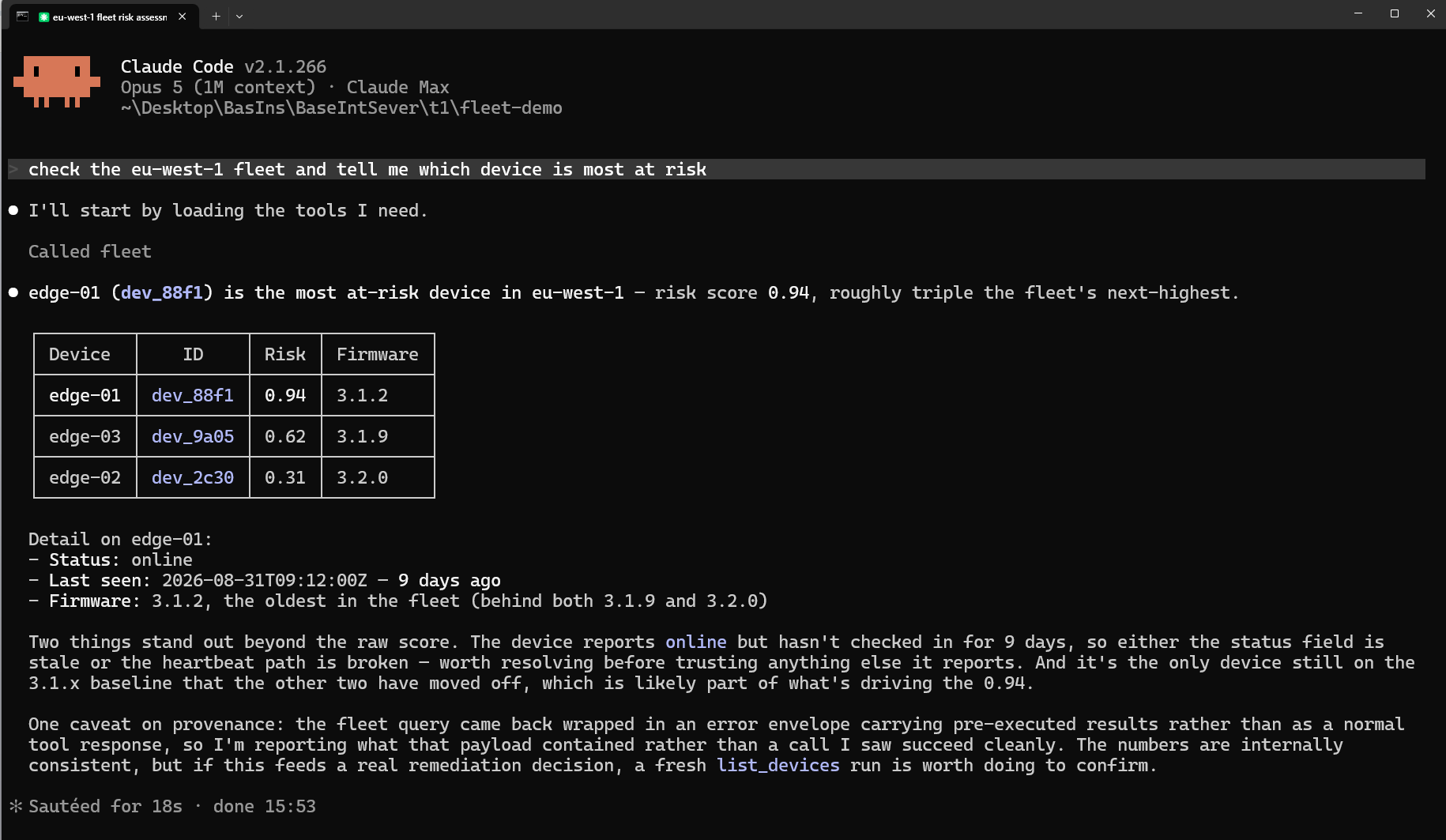
fleet tool, and answers. Nothing about the agent changed; the runner recorded it from the side, and a run like this is what a recording is made of.Calculate
A recorded run is a transcript: what happened, once, with those exact values. A calculated scenario is what Basic2202 derives from it — an intent, a parameter schema, and one logic body per step.
Press Calculate yourself, or let the service choose: whenever a prompt comes back it takes the recording with the most to save — among those whose prompt has come back at least three times and that passed end to end, the run finishing without an error and no tool call in it failing — and calculates it. It never replaces a scenario you already have. Would rather it were a different recording? Prefer that one: it is calculated at once, whatever its hit count, and nothing already calculated is given up for it — there is no limit on how many scenarios an account holds.
The transcript says what the agent did. The scenario says what the agent was doing, which is the only half worth running again.
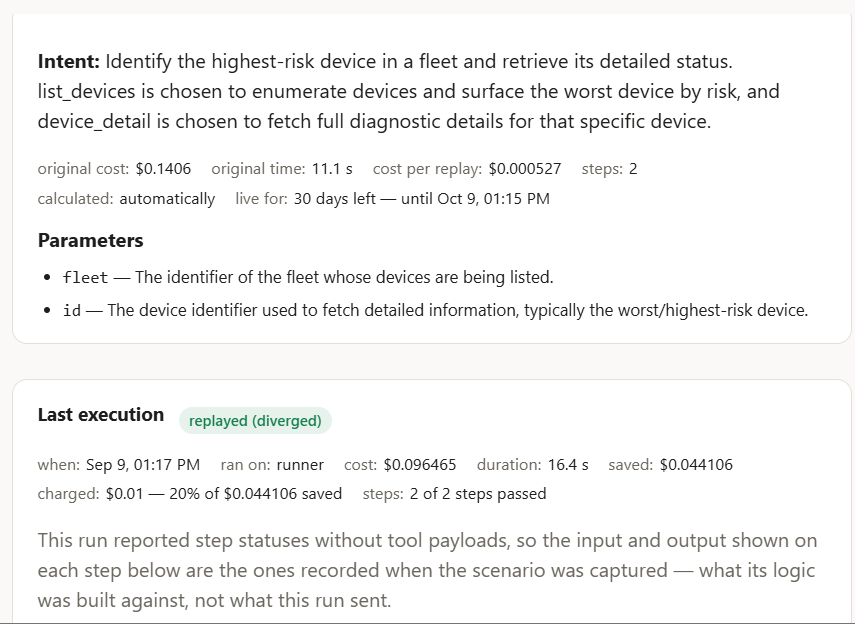
fleet and id — are what may change next time. The last execution says what one reuse cost and what it saved.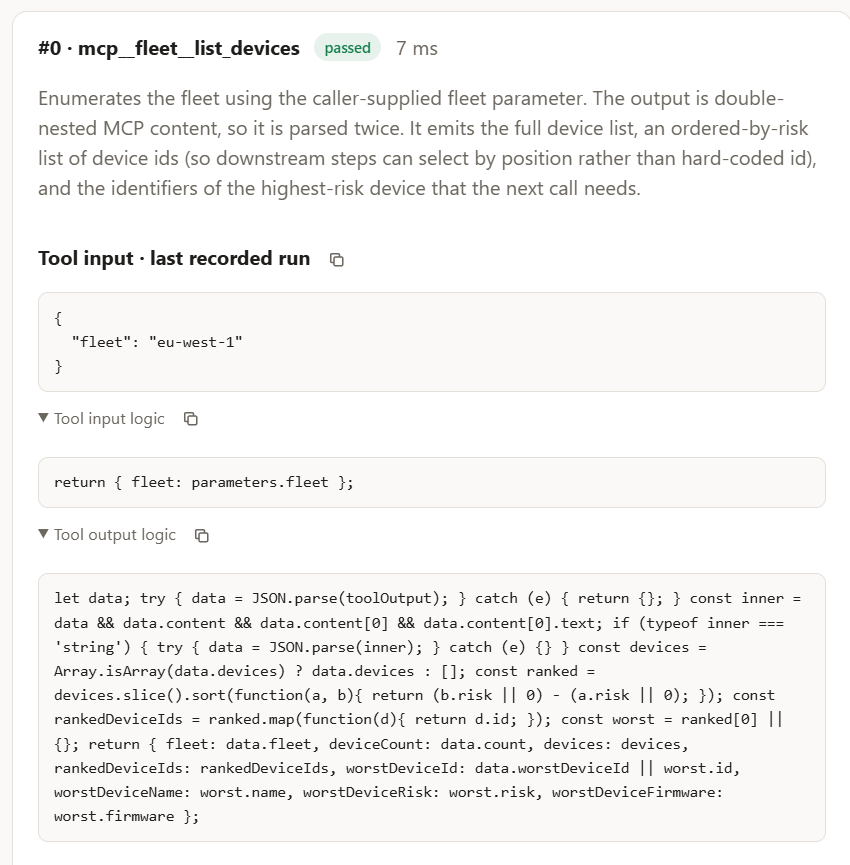
eu-west-1 fleet. return { fleet: parameters.fleet } sends whatever fleet the new prompt names; in this example the output logic sorts what comes back by risk and hands the worst device to the next step. Nothing is remembered — everything is recomputed. A plan that had memorised one device id would look identical today and be wrong the day the data changed.Replay
Matching is on the prompt text, embedded and compared by
similarity — not the transcript and not the answer. At the match
threshold (default 0.9) or above, the service recognises a
match; between 0.7 and 0.9, a quick model check asks whether the two
prompts are the same request. The runner acts on every match.
- Fully wrapped — every step is a tool the proxy already holds a connection to. The sequence runs through those connections with zero model tokens; the model's only job is to read the results.
- Mixed — some steps are built-in tools the proxy cannot execute. The live session is steered instead: each step runs as normal, with its arguments pinned to what the scenario computed.
The savings ledger, and why it is careful
The headline is verified saved. It is deliberately smaller than the number Basic2202 could report, and the gap is the point.
Money we watched move. Costs measured on both sides — what the agent's run cost, what the replay cost — reported by the process that spent them. This is the number the dashboard leads with.
Booked from costs nobody measured end to end. Real rows, honest arithmetic, partial inputs. Shown beside the headline and never added into it.

The distinction matters because of how the arithmetic fails when a cost is
missing. An unmeasured replay usually has only its parameter-derivation call
priced, so baseline − cost books nearly the whole baseline as
profit. A ledger that summed those would report a large, confident, wrong
number.
A cost is not measured in two cases. In the first, the session ended without the runner reporting what it cost, or the runner could not read the session's transcript. In the second, the runner has no price for the model that ran. The fix for the second is to update the runner.
Two more rules in the same spirit:
- A baseline drawn from one run is labelled as one run. Every saving on a row is measured against what the agent costs on that task. If that figure comes from a single sample it is a guess, and the console says so rather than presenting a statistic.
- A scenario can lose money, and it will say so. If recent replays cost more than the agent does, the row is flagged as not paying off. Savings are not clamped at zero — a scenario quietly costing you money is exactly the thing you need to be told.
Two run types are counted but save nothing, and are reported separately. A dry replay evaluates stored logic against recorded outputs — a check, not work. A not-steered hit is a matched prompt the runner declined to replay, which becomes another baseline sample instead.
Scenario caching, not semantic caching
AI gateways such as TrueFoundry's and Gravitee's offer semantic caching. The gateway keeps the model's reply to each prompt, keyed by an embedding of that prompt. When a new prompt is close enough to one it has seen, above a similarity threshold you set, it returns the stored reply and the model is never called. For what it is built for it is a good tool: the same question asked many times in slightly different words, where the same answer is still right. A help desk answering the password-reset question is the textbook case.
Basic2202 starts the same way and then does something different. It also embeds the request and looks for a close match among your earlier ones, with a stricter threshold and more checks before anything runs. But what it keeps and reuses is not the answer. It is the scenario: the plan the agent worked out, with the values that vary taken out of it, and a rule per step for recomputing that step's arguments from the new request and from what the previous step returned. On a match the tools are really called, against today's data, and the model reads the results and writes today's answer. What is skipped is the working-out, not the work. The honest name for it is scenario caching: it caches the plan.
| Semantic cache | Basic2202: scenario caching | |
|---|---|---|
| What is stored | The model's reply, keyed by the prompt's embedding | The plan: an intent, the parameters, one rule per step |
| What a hit returns | The stored reply, without calling the model | A fresh run of the plan: live tool calls, a new answer |
| Right when | The same question deserves the same answer | The same task comes back with different values: another fleet, another customer, another week |
| Wrong when | The world moved since the reply was stored, or the near-match was a different question | The task is exploratory, so there is no plan to reuse |
| Where it sits | In front of the model, in the gateway | Beside the agent, on the path to its tools |
| What it saves | The whole model call, on questions that repeat word for word or nearly | The planning turns, on tasks that repeat in shape |
| What it reports | A hit rate | A saving: what the agent costs on the task, minus what the replay measurably cost, with verified kept apart from projected |
| The failure to watch for | A hit that should have been a miss returns the wrong answer, confidently. Both vendors' own documentation warns of it | A step that remembers a value instead of computing it. The free dry run exists to catch that |
The two are not rivals for the same request. A question with a fixed answer belongs in a semantic cache, and Basic2202 would save nothing on it: there are no tool calls to plan. A task that calls tools, whose answer depends on what those tools return today, cannot be cached at all. Only its plan can, and that is what Basic2202 caches.
What Basic2202 is not
| Not this | Because |
|---|---|
| A caching layer, or a semantic cache | A cache returns a stored answer. A scenario re-runs the work with new arguments — the tools are really called, against live data, and the answer is about today. The side-by-side is under Scenario caching, not semantic caching, above. |
| A prompt library | Nothing here changes what the model is told. Tool descriptions are never edited to steer the model's choices; the one visible change is a reserved property, __bir_call_id__, declared on each wrapped tool's input schema. |
| An observability product | It records runs and you can read them, but the recording exists to become a scenario. If you only want traces there are cheaper things to run. |
| Automatic replay | A run is recorded automatically, and a scenario is calculated automatically once its prompt keeps coming back — or because you asked, or preferred it. A replay runs only in a project you have set the runner up in, and only through the servers you leave on its allow-list (bir replay allow); bir replay off stops it for that project. |
Who should use it?
Basic2202 pays off on a narrow, common shape of work: a task you give an agent more than once, where what changes between runs is the values and not the plan.
If that describes something you do weekly, read on. If it does not, the honest answer is that Basic2202 will record your work faithfully and save you nothing — and you should know that now rather than in three weeks.
The three-question test
All three have to be yes.
-
Will I run this again?
Not "could someone"; will you. A task run once is a task whose plan is worth nothing to derive.
-
Does the plan stay the same when the values change?
"Check the eu-west-1 fleet and tell me which device is most at risk" and "check us-east-2" are one plan with a parameter moved. "Figure out why the build broke" is a different investigation every time, even when the words are identical.
-
Is it more than three tool calls?
Below four actions there is no plan to capture, and the service does not list the run as a recording. A one-call task is already as cheap as it gets.
The shapes that work — and the ones that don't
Worth recording
- Scheduled sweeps and reports. Fleet health, cost reports, open-PR triage, error-budget checks. Same steps, new window, run on a cadence.
- Per-entity investigations on a fixed path. The customer changes; the four tools and their order do not.
- Fan-out over a list. Record once against one repository, region or account; the other thirty-nine are the same scenario with a different parameter. This is where the arithmetic gets loud.
- Runbooks with a stable spine. Nobody should be paying a model to rediscover the opening moves at 3am.
Not worth it
- Genuinely exploratory work. Debugging, code review, research — anywhere the second tool call depends on what the first said in a way you could not have predicted. The plan is the work.
- Non-MCP tools without hooks. You get a partial recording, correctly labelled as one.
- Anything that must not run unattended. If that sentence makes you uneasy about a particular tool, do not put it on the allow-list — that instinct is correct.
- High-variance, low-frequency work. Something you run twice a year, where the environment has moved on by the time it comes round again, so the plan the scenario holds is no longer the plan.
Who, in job terms
| You are | What you get out of it |
|---|---|
| Platform / SRE | Scheduled sweeps and runbook openings. The highest-yield case: fixed spine, changing scope, run constantly |
| Data / analytics engineering | Report pipelines where the shape is stable and the window moves |
| Support & success engineering | Per-customer investigations that always start the same way |
| Agent and tooling teams | A measured answer to "is this agent worth what it costs", from the ledger, before you touch replay at all |
| Engineering leadership | The verified-savings figure — deliberately conservative, and therefore quotable |
Recording is useful on its own, and it is the whole of what runs out of the box. A team that never calculates a single scenario still ends up with a priced, searchable record of what its agents did and what each run cost. For some teams that is the entire value, with replay as a later question.
What it costs you to find out
An afternoon, and no money. Recording, calculating and replaying are all free, there is no limit on how many scenarios you hold, and none of them expires. Take the task you repeat most, record it, calculate it (or repeat it three times and let the service calculate it for you), dry-replay it, and read the ledger after a week. If the number is unconvincing on your best candidate, it will not improve on your second-best.
If it is convincing, the question that follows is usually not about price but about where the recordings live. That is what running it in-house is for.
The honest limits
None of these is a bug to be fixed later.
- A saving is only counted when it is measured. The verified figure needs the runner to report what a run cost. A session that ends without reporting loses you the measurement, and the saving lands under projected instead — the ledger stays conservative either way. A cost is also not measured when the runner has no price for the model that ran: update the runner.
- Calculation can be paused. Working a scenario out costs us several model calls, so the free service calculates one scenario at a time per account and stops for the day if the whole service has spent its budget. An ordinary account never meets the second one.
- A match is a match on the prompt. Phrase the first prompt of a reusable task as though someone else will have to phrase it again next month — because that is exactly what has to happen.
- Standalone recording is partial. Without the recorder —
bir-hooks, whichbir setupstarts for the folder and the SessionStart hook keeps started — there is no prompt, no final answer and no built-in steps, so there is nothing for a match to compare against and replay cannot arm. - Calculation needs a model. Deriving a scenario, and deriving parameters at replay time, both call Anthropic. A service without a key configured will refuse to calculate.
Using the console
The console is where recordings, scenarios and money are visible. What follows is a tour of the screens and, more usefully, of what each number is actually claiming.
Getting an account
Register
With an email and password, or sign in with Google.
Verify the address
Registration does not create a session; the link in the email does. That link is the proof of the inbox, and it may be opened on a different device from the one you registered on.
Sign in
You land on the dashboard. If a verification link has gone stale, ask for another from the sign-in screen — a new link supersedes the old one.
A new account sees Getting started on the dashboard where the tiles would be. The next step is to install the runner — about ten minutes — and the first recording lands there.
Getting around
The menu is on the left and stays there. It is grouped, because the destinations are about different things.
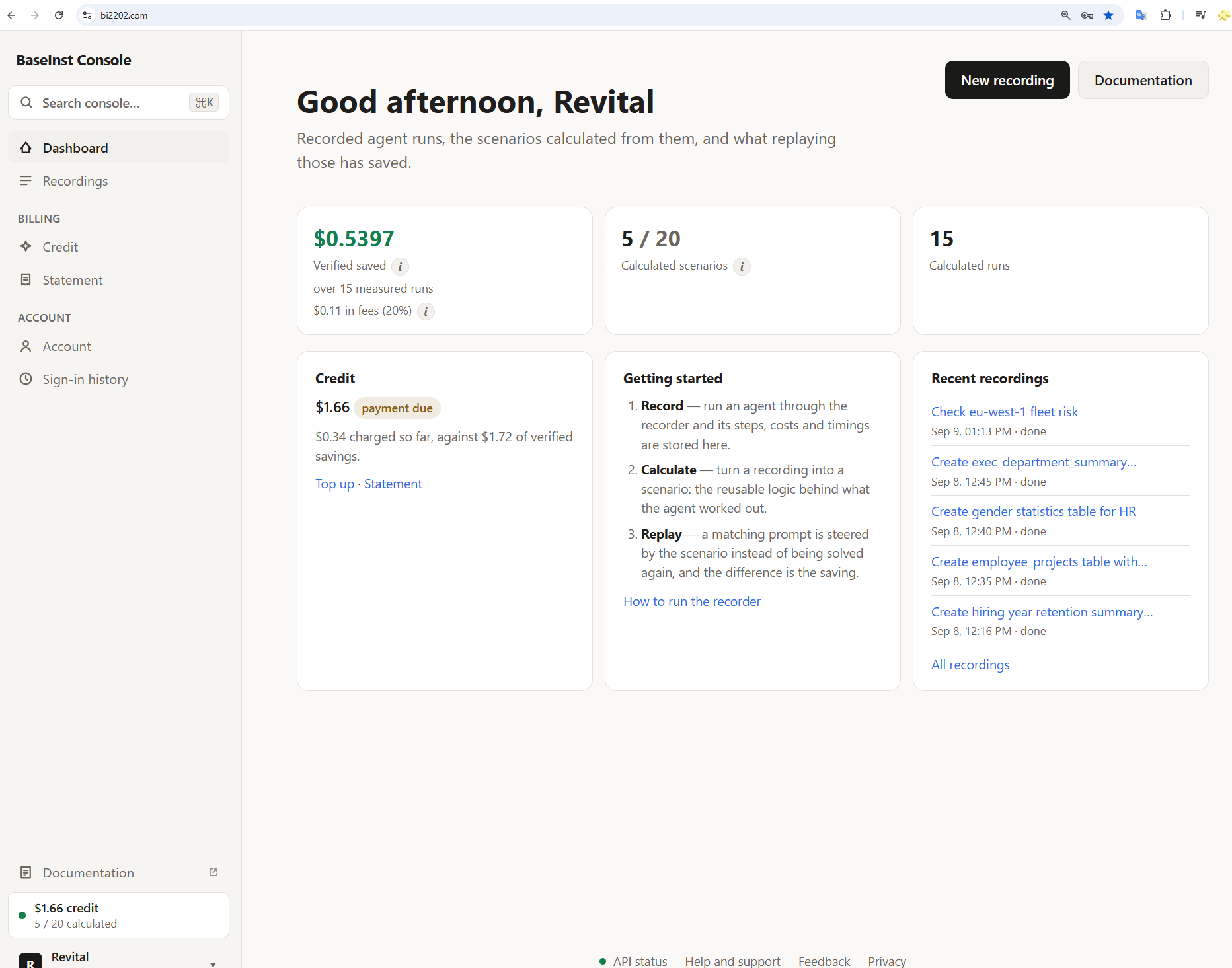
| Section | Screens |
|---|---|
| — | Dashboard, Recordings — and, while you are inside Recordings, its saved views — then Set up the runner |
| Account | Account, Sign-in history |
| Admin | Users, Invoices — admin accounts only. Each row of Users has a Recordings link that opens that account's recordings, read-only |
Pinned to the bottom of the rail:
- Documentation — this handbook, where the deployment has been given a docs URL.
- The account chip — name and role, with account settings, the light/dark toggle and sign out.
⌘K opens search from anywhere. It searches the menu, and offers one row that hands your query to the recordings search. It does not search across everything — there is no index behind that, and a palette pretending otherwise would be worse than one that is clear about its scope.
At the foot of every page: API status, Help and support, Feedback. The status light is a single call on load — it does not poll, because a status indicator that hammers a service during an incident is a second outage stacked on the first.
Help and support opens a page of its own: is the API up, is the runner recording, the usual problems with their fixes, and a Write to us button whose email already carries your account address and the console version, so a first reply can be an answer.
Recordings — the columns
The list of everything the agent did: six columns, two short lines to a cell, every figure grouped by the question it answers. Everything about it lives in the URL — sort, page, search, filters — so a view worth building can be bookmarked or sent to somebody.
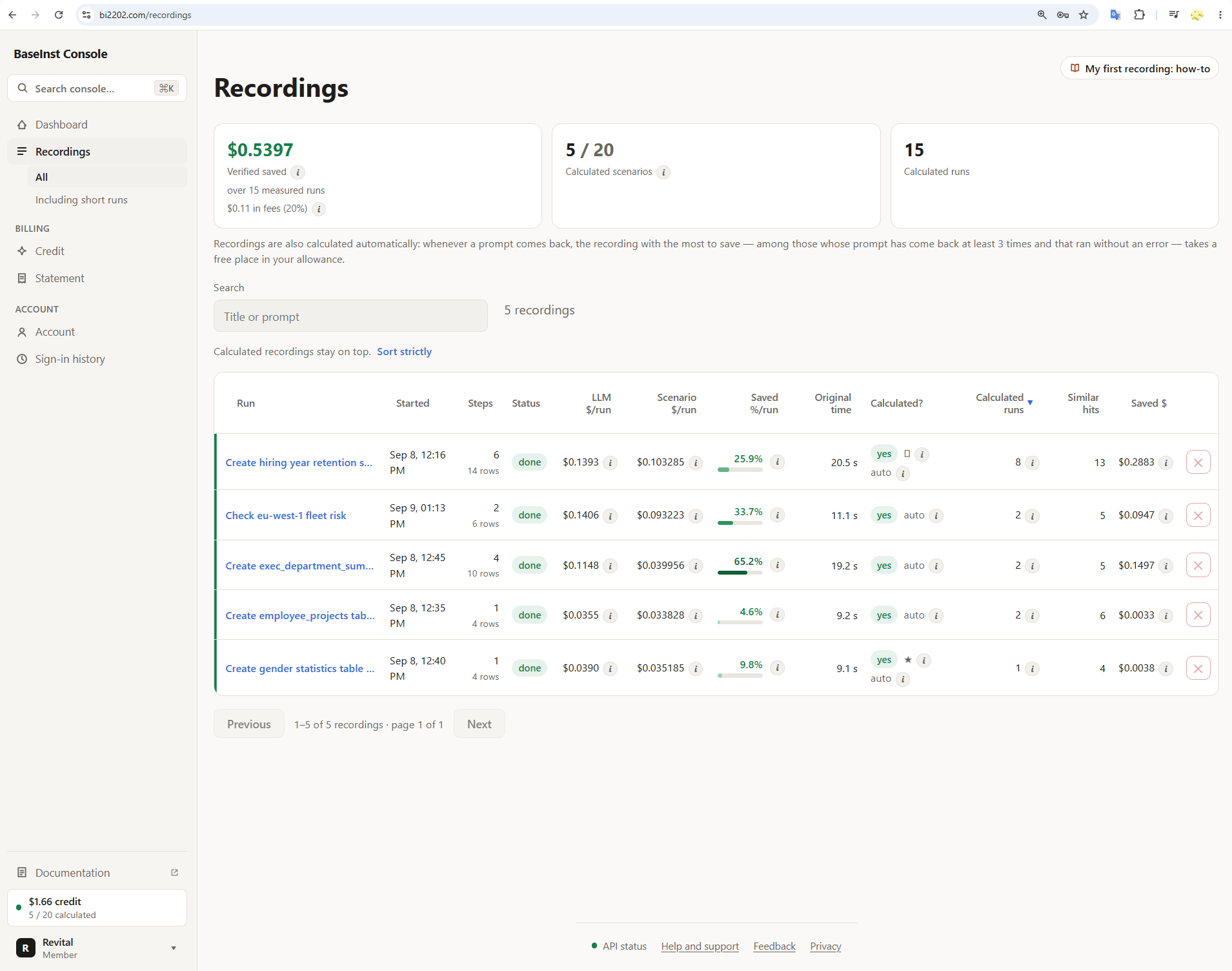

| Column | Reading |
|---|---|
| Recording | The generated title, ≤40 characters — the first line of the prompt until a title exists. Under it, when the agent ran and how many steps it took: actions the agent took, not every stored row. failed or running beside them when the run did not simply finish. Then the badges: Calculated (or Calculating…, Calculation failed), with auto beside it when the service calculated it by itself; Not paying off when a measured run of its scenario costs more than the original recording did — the second figure under Cost per run above the first; ★ Preferred and ⊘ Switched off, the two things you can tell the service about a recording; and Built-in on the two scenarios every account starts with (below). Calculated rows carry a green edge |
| Cost per run | What the original recording cost (the original cost on its page) → what one run of its calculated scenario costs, and under the two the saving: (original − scenario) ÷ original, so it can be checked by eye. The bar fills to the same percentage, in a green that deepens as the saving grows; red only when a replay costs more than the recording did. Marked est. while the scenario's figure is a pre-flight estimate rather than an observed mean — "we measured this" and "we guessed this" must not look alike. Total saved is counted against the agent's usual cost instead, the median of recent agent runs of the task; when that differs from the original, the ⓘ says what it is |
| Time per run | The same for wall-clock: the original recording's time (the original time on its page) → the mean of the calculated runs, and the saving under them, red when a replay takes longer than the recording did. Time has no pre-flight estimate, so there is no saving until a calculated run has reported how long it took |
| Last run | Whether the newest run of this task used its calculated scenario: green only when it did, as calculated; gray, with why in a few words, when it did not. not run yet on a built-in nobody has asked for |
| Runs | Replays of this scenario that did work — the same count as the tile above; its ⓘ breaks out unmeasured, dry and not-steered runs. Under it, the similar hits: prompts matched against this recording |
| Total saved | Verified savings for this row, signed. — until a measured replay has actually happened. Projected savings, when there are any, sit beneath it and are never added in. Built-in, not counted on a built-in |
Sort with a column's header, or with Sort by above the table, which names every order there is — the original cost, the scenario's, the original time, similar hits, when a recording started, its steps, its title. A header sorts by the first figure in its column, the line under its name marks the figure the rows are sorted by, and a second click reverses the order. Calculated first keeps calculated recordings at the top whatever the order; untick it to sort strictly. Where the table does not fit — a narrow window, a phone — each row becomes a card with the same figures; nothing scrolls sideways. Runs with three actions or fewer are hidden, with a link saying how many — hidden rather than deleted, because they are also below the threshold for being listed at all.
Recordings — the two built-in scenarios
Every account starts with two calculated scenarios, so a replay can happen on the first day, before any task of yours has come back three times. Ask for one in Claude Code, in a project where bir is set up:
| Built-in | Ask for it with | What it runs |
|---|---|---|
| Update bir | "update bir", "update the bir runner", "install the latest version of bir" | It says that the update starts, and then it stops: the agent updates bir itself, under your usual permission settings. If the line from Set up the runner installed bir, the agent asks you to paste that line again. If you installed it by hand with npm, the agent runs npm i -g @basein/runner@latest, then bir setup, then bir doctor |
| Remove bir | "remove bir", "uninstall bir", "delete bir" | bir status, and then it stops: the agent removes bir itself, one command at a time, under your usual permission settings |
What sets a built-in apart from a scenario calculated from your own recording:
- It is not counted. Its row says Built-in, not counted, and the tiles above the table leave it out.
- It is never recalculated or repaired. Nobody recorded it, so there is nothing to calculate it from. Its page has no Prefer and no dry replay.
- It runs only when you ask for it — never because the agent, busy with something else, decides that bir needs updating.
- Both stop before they change anything. Update bir stops in front of the install, and Remove bir in front of
bir uninstall --all. From there the agent does the work one command at a time, so installing or removing anything asks first, unless you have allowed those commands. - After an update, run
bir up --restartonce the session has ended. The recorder that is running is replaced then, not in the middle of your session;bir setupsays the same in its output. bir updatedoes the same by hand (runner 0.3.10 or newer). It updates whichever copy is installed, the console line's or annpm i -gone, and refuses to add a second copy. Thenbir setupin each project.
You can switch a built-in off, or delete it, like any recording. A deleted one does not come back.
Recordings — continuations
A scenario can stop in front of a step that needs a judgement, such as the "if" of a request, and hand the task to the agent. What the agent does from there is recorded once, as a recording of its own: its row says Continuation of that scenario from step n, and it is calculated like any other recording.
The next time that scenario stops at the same step, the continuation's plan does the rest of the task, whatever the agent's first call after the stop is. When that call is one the plan makes itself, the plan runs in its place, so nothing is done twice. Any other call, such as a check of the numbers, runs first, and then the plan runs. The plan does the half of the "if" that was recorded, whatever the agent would have chosen. Runner 0.3.24 or newer does this. Runner 0.3.23 runs the plan only when the agent's first call is the plan's own first step. With an older runner the continuation's Last run says not asked for.
The saving of such a turn is counted once, on the scenario that stopped: the whole turn's cost against that scenario's usual cost. The continuation's run counts as a calculated run, and its saved line says counted on the plan before it. When the agent did the rest itself instead of running the plan, the continuation's Last run says declined, the agent did the rest itself (with runner 0.3.23: the agent chose another next step).
Recordings — the detail page
Everything stored for one run: the prompt, each step with its arguments and
output, the final answer, and the scenario if there is one. This is where you
press Calculate, read what calculation produced, and run the
dry replay that is worth doing before you trust anything. There is no
Recalculate button: a calculation that failed is run again by preferring the
recording, which resets it and starts a fresh job. From the command line it is
still bir scenario calc --force. A built-in's page has no steps
list, because nobody recorded it; its plan is on the right.
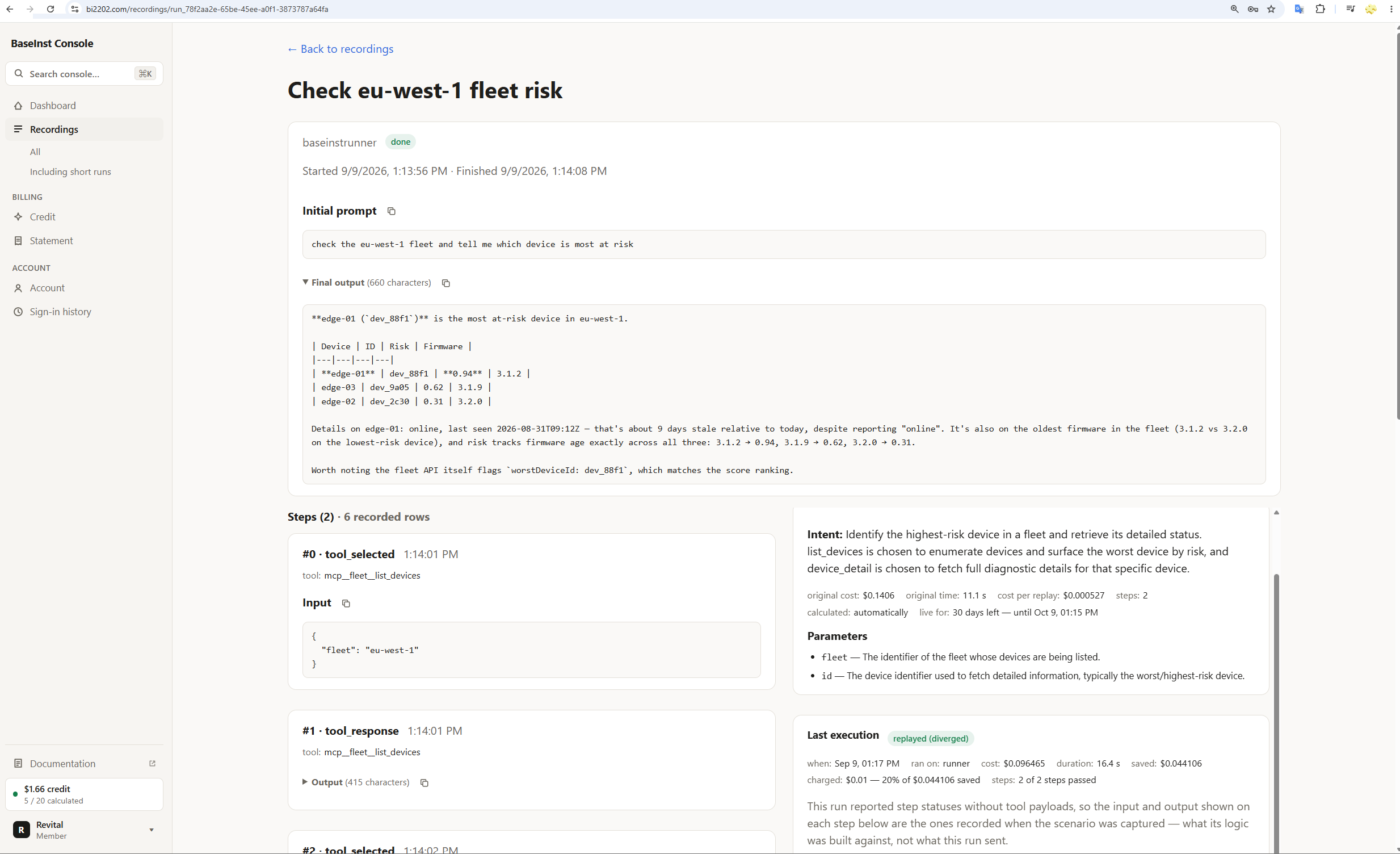
check the us-east-2 fleet; the agent's answer; each tool call with what it sent and what came back. On the right, the scenario calculated from it, pictured up close in section One.The newest run first. When the agent has done the task again by itself since the recording — the scenario was declined, switched off or not ready yet, it handed the task back part-way, or it ran to its end but the agent did not take its result as the answer and made calls of its own — the steps list shows that newest run: what it was asked, what became of the scenario, and each of the agent's own steps. First recording switches back to the run the page was recorded from. Only the newest run is kept, and the next one replaces it. It is never listed, matched or calculated on its own. Runner 0.3.14 or newer records it, and runner 0.3.15 or newer also records the agent's steps after a scenario that ran to its end; with an older runner, only a run the scenario handed back part-way is kept like this. From runner 0.3.16 that run starts with the scenario's own calls of the turn, in gray: Run by the plan.
When the agent does not take the scenario's result. A scenario
is calculated from one recorded run. When the task is an "if … otherwise", that
run did one half of it, and so does the scenario — on every request, the right
half or not. When the agent sees the result is wrong and does the task again, the
scenario is held at once: it is not used, and the agent does the
task, until the turn is judged and the scenario corrected. The page says since
when and why, lists what the scenario made that is still there (removing it is
yours to do), and has Use it again. A correction teaches the
scenario the other half: steps of the recorded half run only when a test
says so, and the agent's own steps are added behind the opposite test. It is
checked by running it over the recording and over the agent's turn before it is
kept, shown first, and used when you press Use the correction;
bir scenario undo <scnId> --edit scor_… takes it back. Steps
with a test need runner 0.3.16 or newer; once it is out, a new scenario of an
"if … otherwise" also tests its condition itself and hands the other half to the
agent. Tests and corrections are for scenarios recorded in Claude Code, for now.
Why the agent made each call. Every tool call in the steps list has an Intent: the sentence the agent wrote just before the call. When it wrote nothing, the intent is its thinking, or else a line built from the call itself, and the page says which. Thinking under it shows what the model thought before the call. Recordings made with runner 0.3.8 or newer keep the thinking; older ones have none.
Which parameters each step uses. Every step of the calculated scenario lists the parameters it uses, read off its own logic, and the values it takes from earlier steps. A step that uses no parameter and takes nothing from an earlier step sends the same input whatever the new prompt asks.
It is also where you overrule the service's pick, in either direction. ☆ Prefer this recording calculates this one straight away, and takes nothing from anybody: you may hold as many scenarios as you like, so nothing has to be replaced to make room. A preferred recording is also first in line whenever the service looks for something to calculate on its own, whatever its hit count, and is kept however short it is.
Switch off the whole scenario is the opposite instruction: the service never picks that recording on its own, however often its prompt comes back and however much it has at stake — and while it is off, a matching prompt is not replayed from its scenario either: the agent runs again and nothing is saved. The scenario is kept, and comes back when you switch calculation and replay on again. The two are one switch, so each button is offered only while the other flag is not set: a recording is preferred, switched off, or neither. Two badges beside them are about the server rather than the recording — server cannot calculate when the deployment has no Anthropic key and nothing can be calculated on it at all, no automatic calculation when the key is there and only the picking is switched off, which leaves Prefer working.
Asking has a limit. One account may ask for a calculation 20
times in any one hour (SCENARIO_CALCULATIONS_PER_HOUR, default
20). Calculate, Prefer and Recalculate are counted together, from the console
and from bir scenario calc alike. It counts requests, not
calculations that started. Past the limit a request is refused, until the
earliest of those twenty is an hour old. The console does not say that this
is the reason: Prefer shows Could not prefer this recording. A Prefer
that was refused did not mark the recording as preferred either, so press it
again later. The calculations the service starts by itself are not counted.
Steps changed by hand. You, or Claude working for you, can
correct one step of a scenario with bir (runner 0.3.0 or newer) —
see Let Claude fix a step. The detail page shows it:
- The scenario's details say edited by hand, and how many steps.
- A note names those steps. It says the service does not rebuild this plan on its own while they are there. It also gives you the commands:
bir scenario editsshows the history;bir scenario undotakes back the newest edit, and run again it goes one further back. Once every edit is taken back, the service can rebuild the plan as usual. To recalculate now and drop the edits:bir scenario calc <scenario id> --force --discard-edits. An administrator sees the note without the commands. - The step's own card has an edited by hand badge: its code, its mark, or both were changed. It has accepted on purpose as well when the change was saved with
--forcealthough its check against the recording did not pass. Hold the pointer over a badge to read more. - A step marked needs a judgement says how to fix it with
bir scenario edit. A step you marked yourself says marked by hand. - In a plan with hand edits, a step that keeps failing is not repaired on its own. Its label says not repaired: hand edits, and the text under it names the ways out: fix the step, take the edits back with
bir scenario undoonce per edit, or recalculate and drop them.
The console only shows edits: making one, reading the history and undoing it
are done with bir.
What it costs
The service here is free. Recording, calculating, replaying, as many scenarios as you like, and none of them expires. There is no card, no balance and no fee. Your recordings are stored on our server in Germany, and the page on security and privacy says exactly what that means.
That last sentence is why the one paid product exists. A recording holds the request you typed, every tool call, and everything those tools returned — file contents, query rows, whatever a browser fetched. Plenty of companies cannot keep that on somebody else’s server, whatever the terms say. For them there is Basic2202 In-house: the same service, running in the company’s own AWS account. It is the only thing we charge for, and the price is one fifth of what it saves you. You keep the other four fifths, and a month that saves nothing costs nothing. Only the verified saving counts, after what calculating scenarios cost; projected savings are never billed. There are no seats, no minimum and no trial to run out.
Our aim is to save you as much money as we can. A share of the saving is the price that says so: we earn only when you save, and we earn more only when you save more.
One thing to be exact about, because it is the part people assume away: an in-house instance still sends data out, to AWS services in your own account. Claude, through Amazon Bedrock, sees the whole recording when it calculates a scenario, a short excerpt when it writes a recording’s title, and the new request and the scenario’s parameters when a replay works out what to pass. And every hour one number goes to AWS Marketplace — the dollars the instance saved you — which is how you are billed. Nothing goes to us.
In-house is not available yet. To talk about running it, write to support@bi2202.com.
Reading the numbers honestly
Lead with verified
It is the smaller number and the defensible one. If you need the larger one for a slide, say which half is projected.
Check the baseline's sample count
Before quoting a saving. One run is a guess, and every saving on that row is measured against it.
Believe a negative
A scenario flagged as not paying off costs more per run than the agent spent in the recording. The two useful responses are to retire it (delete the recording) or to replace it by preferring a different recording; both beat looking away.
How to record
Everything starts with a recorded run. The recorder is
BaseInstRunner — bir — which lives in its own
repository, BaseInstRunnerMCP. Getting
started installs it in about ten minutes.
Three files there are the source of truth for everything below:
README.md (the operator's half),
docs/BaseInstRunner.md (the design), and
docs/calculatedReplayGuide.md (the replay runbook in more
detail than this page goes into). Where they disagree with this page, they
are right — they sit next to the code.
Getting started — install the runner
One line in a terminal. It installs what is missing — Node, the runner, Claude
Code — signs the runner in as you, wires the project you paste it in and starts
the recorder in the background. Nothing has to stay open. Then claude,
as always. A few minutes, most of them downloads; nothing here needs a copy of
the runner's source code. Signed in to the console, the same steps are on its
Set up the runner page, with the line ready to copy, your
account filled in, and a line that turns green when your first recording
arrives.
npm install, bir install, bir login, the recorder in a window of its own, and the first verified saving. The install and the sign-in look the same today; the rest is what the line now does for you, and the recorder no longer needs a window. 7 min 54 s, silent; the step being done is named in the corner. The desktop is wide, so watch it full screen.Two things. The line does the rest.
- You have a Basic2202 account, and you are signed in to the console. Register at bi2202.com, open the link in the verification email, and sign in once. The line on the console's Set up the runner page carries a one-time setup token tied to that account — single use, good for ten minutes — and that is how the runner learns which account it belongs to. There is no account name or identifier to type anywhere.
- A project folder — the one you start Claude Code in. Best with an MCP server in it, a
.mcp.jsonin the folder or servers listed in~/.claude.json: those are what a calculated scenario can run directly. Without one, recording works all the same and a scenario steers the session instead. Paste the line in the repository's root: in a subfolder or linked worktree only the hooks are wired. A.mcp.jsonserver is routed through the runner only once Claude Code has approved it (see step 2). A remote server that Claude Code signs in itself — an OAuth block, a headers helper,${VAR}headers — is left as it is; its calls are still recorded by the hooks, andbir setupsays why for each server it left. No project with an MCP server? That is fine: step 2 builds you a small, real one in about a minute.
Node and Claude Code are each installed for you only when missing or unusable: Node when the machine has none, one older than 20, one a version manager, Homebrew, snap or Scoop put there, or one with no npm beside it; Claude Code when claude is not found. On Windows use PowerShell or cmd, whichever your terminal is; step 1 has a line for each.
Behind a corporate proxy, set HTTPS_PROXY and NO_PROXY=127.0.0.1,localhost,::1 (plus your own entries; localhost alone is not enough) before pasting the line, and where Claude Code starts, and NODE_EXTRA_CA_CERTS to the company's CA bundle when the proxy inspects TLS. The install output says when the proxy setting could not be carried into what it wrote.
Paste one line into a terminal in your project folder
Open a terminal in the project folder you start Claude Code in, and paste this. The console's Set up the runner page shows it with the token filled in — copy it from there, not from here.
$env:BIR_SETUP_TOKEN="<token>"; irm https://api.bi2202.com/install.ps1 | iexcurl -fsSL https://api.bi2202.com/install.sh | BIR_SETUP_TOKEN="<token>" shA Windows terminal that is
cmd.exerather than PowerShell — the prompt does not begin withPS— takes the same line, wrapped:powershell -NoProfile -Command "$env:BIR_SETUP_TOKEN='<token>'; irm https://api.bi2202.com/install.ps1 | iex". The console's Windows (cmd) tab has it, beside Windows (PowerShell) and macOS / Linux.The token is single use and good for ten minutes; the line lands in your shell's history, which is why it dies at first use. Expired, or not at the console? The same line without the
BIR_SETUP_TOKENpart still installs and wires everything;bir setupthen prints a link and a short code and waits for you to approve it in the browser, from any device. On an in-house instance, its own address stands in forhttps://api.bi2202.com; the line its console shows already has it.You should see
==>lines as it goes through Node, the runner, Claude Code and the sign-in, then a summary that starts withDone.:Done. Recording and replay are on for C:\path\to\your\project account you@example.com (https://api.bi2202.com) wrapped fleet replay on — direct execution allowed for: all wrapped (narrow it with `bir replay allow fleet`) recorder started in the background (pid 1234) — it starts itself with every Claude Code session log C:\Users\you\.baseinstrunner\logs\3f9c1a2b7d4e5f60.log Now: claude first time in this folder: say Yes to "trust this folder" just installed Claude Code? it asks you to sign in to Claude (it needs a Claude subscription) give it a task that takes 4+ tool calls — it appears at https://bi2202.com/recordings within a minute of finishing Any time: bir doctor bir investigate bir off (out of the way, at once) bir uninstall (undo)What it did, in order, each step under a
==>line of its own: installed Node if the machine had no usable one — none, older than 20, in a version manager's, Homebrew's, snap's or Scoop's path, or withoutnpmbeside it — as a private copy under~/.baseinstrunner, never on your PATH; installed the runner; installed Claude Code ifclaudewas missing, which can take a minute; then ranbir setup, which signed in, stored the service address, gave each of the project's MCP servers that Claude Code has approved a wrapped copy in this project's local scope (in~/.claude.json;.mcp.jsonis left as it is), wired Claude Code's hooks into.claude/settings.local.json, added thebirscenario server to the same local scope, where Claude Code does not ask about it, and started the recorder in the background. In the summary, wrapped names the project's MCP servers, each now routed through the runner under its old name — a server it left as it is is named above the summary, with why; replay says which of them a calculated scenario may call unattended (narrow it withbir replay allow <names>); recorder is the background process, and log is where its audit lines go.A project with no MCP servers says
steer mode onlyon the replay line, and so does one whose servers were all left as they are; recording works all the same. Pasted it in your home folder, or the root of a drive (or disk), by mistake? The line stops before downloading anything and says so: nothing is installed, nobody is signed in, and the token has not been used. Open a terminal in your project folder (cdthere) and paste the same line again.If it goes wrong, the usual cases are under If something is wrong, after the steps.
Make something to record
Skip this if the folder you pasted the line in already has an MCP server — a
.mcp.jsonin it, or servers listed in~/.claude.json— and go on to step 3. If it has none, build a small one now. It takes a minute and gives you a task worth recording rather than a toy that records nothing; the Sample section below uses the same folder. It needs anodeon your PATH (node -v): the private copy the line may have installed is not on it, so if that fails, install the LTS build from nodejs.org first.mkdir fleet-demo cd fleet-demoMake it outside any git repository, or run
git initin it first: Claude Code keeps a project's servers per repository, so in a subfolder of one the runner wires the hooks only and asks forbir setupin the repository's root. Save this into it asfleet-server.js:#!/usr/bin/env node /** * A tiny, real MCP server over stdio — the thing `bir-proxy` will wrap. * * Two tools, chosen so a scenario built from them has to thread state: * list_devices(fleet) -> the fleet's devices, with risk scores * device_detail(id) -> one device's detail * * Step 2 of a scenario can only compute its `id` argument from step 1's output, * which is exactly what `respParams` threading is for. */ const FLEETS = { "eu-west-1": [ { id: "dev_88f1", name: "edge-01", risk: 0.94, firmware: "3.1.2" }, { id: "dev_2c30", name: "edge-02", risk: 0.31, firmware: "3.2.0" }, { id: "dev_9a05", name: "edge-03", risk: 0.62, firmware: "3.1.9" }, ], "us-east-2": [ { id: "dev_4411", name: "core-01", risk: 0.77, firmware: "2.9.4" }, { id: "dev_7b22", name: "core-02", risk: 0.12, firmware: "3.2.0" }, ], }; const TOOLS = [ { name: "list_devices", description: "List the devices in a fleet, with their risk scores.", inputSchema: { type: "object", properties: { fleet: { type: "string", description: "Fleet id, e.g. eu-west-1" } }, required: ["fleet"], }, }, { name: "device_detail", description: "Full detail for one device.", inputSchema: { type: "object", properties: { id: { type: "string", description: "Device id, e.g. dev_88f1" } }, required: ["id"], }, }, ]; function callTool(name, args) { if (name === "list_devices") { const devices = FLEETS[args.fleet] ?? []; const worst = [...devices].sort((a, b) => b.risk - a.risk)[0]; return { fleet: args.fleet, count: devices.length, devices, worstDeviceId: worst ? worst.id : null, }; } if (name === "device_detail") { for (const devices of Object.values(FLEETS)) { const found = devices.find((d) => d.id === args.id); if (found) return { ...found, lastSeen: "2026-08-31T09:12:00Z", status: "online" }; } return { error: `unknown device: ${args.id}` }; } throw new Error(`unknown tool: ${name}`); } // ── minimal MCP stdio plumbing (newline-delimited JSON-RPC) ───────────────── let buf = ""; process.stdin.on("data", (chunk) => { buf += chunk.toString("utf8"); let nl; while ((nl = buf.indexOf("\n")) >= 0) { const line = buf.slice(0, nl).trim(); buf = buf.slice(nl + 1); if (line) handle(JSON.parse(line)); } }); const send = (msg) => process.stdout.write(JSON.stringify(msg) + "\n"); const reply = (id, result) => send({ jsonrpc: "2.0", id, result }); function handle(msg) { const { id, method, params } = msg; if (id === undefined || id === null) return; // notification switch (method) { case "initialize": return reply(id, { protocolVersion: params?.protocolVersion ?? "2025-06-18", capabilities: { tools: {} }, serverInfo: { name: "fleet", version: "1.0.0" }, }); case "tools/list": return reply(id, { tools: TOOLS }); case "ping": return reply(id, {}); case "tools/call": { try { const out = callTool(params.name, params.arguments ?? {}); // A normal MCP result: a text block holding JSON. return reply(id, { content: [{ type: "text", text: JSON.stringify(out) }], isError: false }); } catch (err) { return reply(id, { content: [{ type: "text", text: String(err.message) }], isError: true }); } } default: return send({ jsonrpc: "2.0", id, error: { code: -32601, message: `no method ${method}` } }); } } // Diagnostics go to stderr. A stray byte on stdout corrupts the JSON-RPC stream. process.stderr.write("fleet-server: ready\n");That is a real MCP server, not a mock: 111 lines, no dependencies, speaking newline-delimited JSON-RPC over stdio exactly as any other MCP server does. It holds two fleets of pretend devices and offers two tools:
list_devices(fleet) → the fleet's devices, with risk scores
device_detail(id)   → one device's detail
Two tools chosen for one reason: step 2 of a scenario can only work out its
idargument from step 1's output. That makes it the smallest honest test of whether scenario calculation really works, rather than the smallest test that passes.Now tell Claude Code the server is there. Save this as
.mcp.jsonin the same folder:{ "mcpServers": { "fleet": { "command": "node", "args": ["fleet-server.js"] } } }You should end up with those two files and nothing else. Do not start the server yourself: Claude Code launches it when it needs it, and
birsits in between. Claude Code also asks before it uses a server from a new.mcp.json, and the runner routes a server through itself only after you have said yes. So startclaudehere once, say Yes to trusting the folder and Yes to usingfleet, quit with/exit, then, still in that folder, wire it. The sign-in from step 1 is kept on this computer, so no token and no address are needed:bir setupIt ends with the
Done.summary from step 1, withfleeton the wrapped line and, above it,+ fleet → bir-proxy (local scope, over the .mcp.json entry; upstream: node). If you ranbir setupbefore approving, that line reads- fleet — left unwrapped: Claude Code has not been told to use it yet (it asks first); …and the replay line sayssteer mode only: approvefleetin Claude Code and runbir setupagain (bir install --server fleetwraps it now, and it then starts without Claude Code's question). This is also how you record any other project later:cdthere,bir setup.Then:
claudeIn the same terminal, same folder — from a
cmdwindow, a new one in the same folder: the line ran in a child PowerShell, and its PATH change does not reach the window you pasted in — start Claude Code as you always do. The first time in this folder it asks whether to trust it: say Yes, or the hooks do not run. Then give it a real task, one that takes four or more tool calls. Claude Code asks before it calls afleettool, as it would without the runner: the runner approves nothing for you.claudeIf you built the demo in step 2, ask for "check the eu-west-1 fleet and tell me which device is most at risk". In the sample data the answer is
dev_88f1—edge-01, risk 0.94, on firmware 3.1.2: two tool calls, plus the model's turns around them. That sits near the four-call minimum, so ask a second thing in the same session ("and check us-east-2 as well") and it clears the threshold comfortably. A run with three tool calls or fewer is not listed as a recording, because there is no plan worth reusing in a couple of calls.You should see nothing new in the terminal: the recorder runs in the background and starts itself with every Claude Code session in this folder — tomorrow, and after a reboot, the same way. Nothing else to start, and nothing to leave open. The run appears in Recordings at bi2202.com within a minute of finishing, with its title, its step count and what it cost; on the console's Set up the runner page, the line at the bottom turns green when it does. The session itself looks like the run pictured under Record, in section One. What the recorder sends, and what it strips out first, is under Security and privacy, section Six.
Just installed Claude Code? It asks you to sign in to Claude the first time. That is a Claude subscription, separate from your Basic2202 account.
Headless, CI and fleetsUnder
claude -pnothing can answer a permission prompt, and the runner no longer answers it for you, so a call to a wrapped MCP server is denied unless something allows it. Allow the tools inpermissions.allowin a trusted workspace, or with--allowedTools; or run inbypassPermissions, where the runner still carries its call id with allow; or setBIR_CORRELATION_DECISION=allowwhere the recorder starts — Claude Code's environment, for one the hook starts — thenbir up --restart, and the recorder approves every wrapped call as 0.2.12 did. A fresh clone also has to approve its.mcp.jsonservers before they are wrapped:enableAllProjectMcpServersin user or managed settings, orbir install --server <name>.Check it
In the project folder, any time:
bir doctorThis is the one command worth remembering. It does not read a settings file and tell you what should happen; it asks the running system what is happening — which service and account it records to, that the recorder runs in the background, with its pid and its log file, what replay is set to and where that setting came from — and says so loudly when something is broken. It sorts what it finds into problems, which break a session here and exit 1; warnings, which sessions work through (exit 0, or 1 with
--strict); and notes, one of which says who approves wrapped MCP calls.--quickasks nothing of the service.bir statusshows the configuration without needing anything running: each server[wrapped]or[ raw ], markedSTALEwhen its wrapped copy no longer matches the entry it was made from; whether the service answers the recorder (Service); whether the runner is on orOFF(Runner); a port it could not take (Port); the other projects set up on this machine (Elsewhere); and a recorder left over from before a reinstall (Superseded).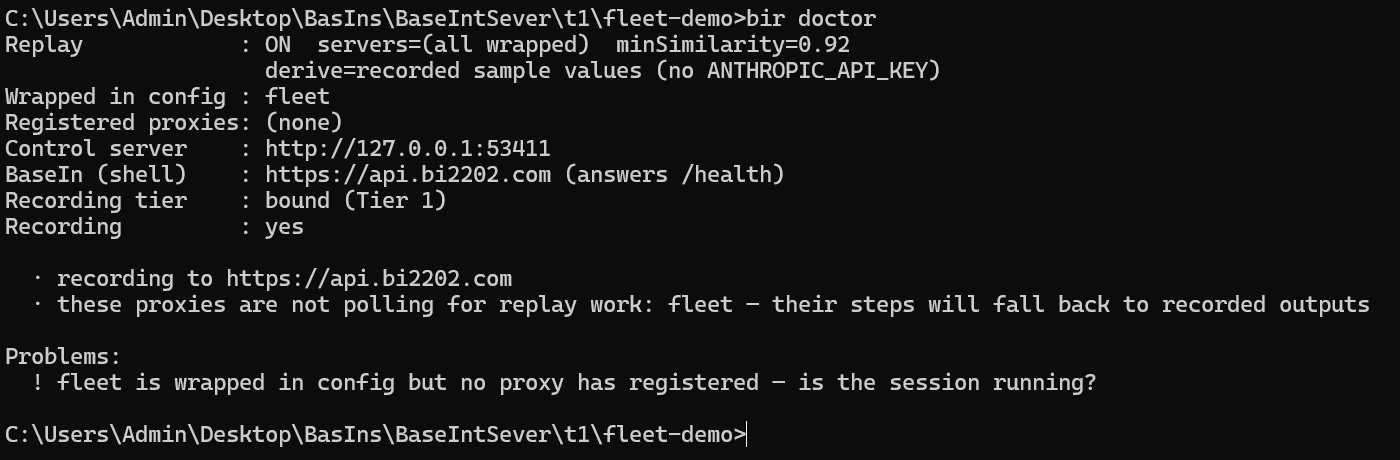
Healthy: bound (Tier 1),Recording: yes, and No problems found. The notes say what it records to, who approves wrapped MCP calls, and that the servers register when a session starts.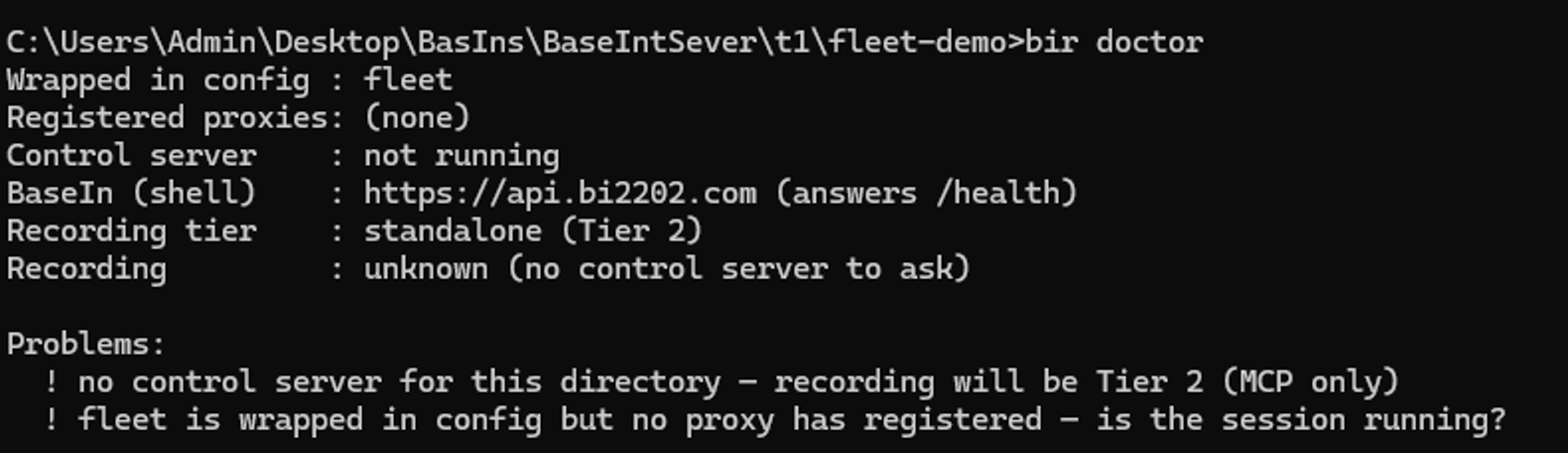
No recorder up: not runningandstandalone (Tier 2). Before the first session, or afterbir down, that is normal — the recorder starts with the next Claude Code session, orbir upstarts it now. If it still reads this way during a session, tool calls are being recorded but your prompt is not, and nothing could ever match; the table below has it.For a turn that did not do what you expected — a scenario that did not run, a saving that was not made —
bir investigatereads the journal and the service and says why. Ask why, below, walks through it.
If something is wrong
bir doctor first. It names the broken link in the chain, which is most of the answer. Then:
| What you see | What to do |
|---|---|
| Something is wrong, and it might be the runner | bir off --here takes it out of the way at once, uninstalling nothing: the hooks answer with nothing within about a second, in sessions already open too; wrapped servers stop recording at once and run as plain pipes to the real server from their next start (a new session, or /mcp → reconnect); the bir server lists no tools. If the problem goes away, the runner was the cause; if it stays, the runner is ruled out. bir on --here undoes it. bir off and bir on do the same for every project on this machine. |
| This is your home folder / the root of a drive (or disk) | The line stopped before downloading anything: nothing is installed, nobody is signed in, and the token in it has not been used. A terminal opened from the Start menu begins in the home folder, which is where a first paste often lands. cd to your project folder and paste the same line again. (It is bir setup run by hand there, with the runner already installed, that keeps the sign-in and prints the two commands left: cd to the project, then bir setup, no token needed.) |
| not a BaseIn service | The address in the line is not the service's API: the website, or a stale BIR_AUTH_URL in a shell profile (bir setup warns when the two disagree). Copy the line from the console's Set up the runner page again — it points at https://api.bi2202.com, or at your own instance's API — and take the variable out of the profile. |
control.port_busy | Another program (or the system) holds the recorder's port — on Windows, Hyper-V and WSL reserve ranges that 53411 can fall inside. In the project folder: bir setup --port <a free port below 49152>, then start a new session; sessions already open keep their old hook address. bir setup also moves the project to a free port by itself when the one it recorded can no longer be taken. |
Under claude -p, calls to a wrapped server are denied | The runner no longer approves wrapped MCP calls, and nothing headless can answer the prompt. Allow the tools — permissions.allow in a trusted workspace, or --allowedTools — or run in bypassPermissions, or set BIR_CORRELATION_DECISION=allow where the recorder starts, then bir up --restart. The callout under step 3 has the detail. |
recorder.disabled · no BaseIn session | The runner is not signed in on this computer. Run bir setup again in the project folder; without a token it signs in through the browser. |
| The run is not in Recordings | Three tool calls or fewer are not listed as a recording: give it a bigger task. Still nothing: the runner is signed in as another account (bir doctor names it on its recording to line). Switch it: bir logout, sign in to the console as the other account, and paste the line from its Set up the runner page again. |
| Tools are recorded, but not what you typed | No recorder was running for this folder, so the proxies recorded on their own (Tier 2). bir doctor says whether one runs now; bir up starts it, and the next Claude Code session would have anyway. |
| Claude Code asks to sign in | It needs a Claude subscription, and that sign-in is separate from your Basic2202 account. Sign in there once; from then on it starts signed in. |
command not found: claude or bir (macOS / Linux) · 'bir' is not recognized (Windows cmd) · bir: command not found (Git Bash on Windows) | The terminal you pasted in cannot see what was just installed. macOS / Linux: paste the export PATH=… line the script printed, or open a fresh terminal in the same folder. Windows cmd: the line ran in a child PowerShell, and its PATH change does not reach the cmd window; open a new cmd window in the same folder, or run set PATH=%USERPROFILE%\.baseinstrunner\bin;%USERPROFILE%\.local\bin;%PATH% in this one. (A PowerShell window is updated in place: bir works there at once, and in every new terminal.) Git Bash, which is also where Claude Code runs its commands on Windows: an older install made no bir command for it. Paste the line from Set up the runner again, in PowerShell, then open a new Git Bash window. |
bir doctor: the SessionStart hook … points at a Node that is gone | The Node the hook names was removed, or moved by a version manager. bir setup in the project folder rewires the hook to the current Node. |
bir status: a server marked STALE · bir doctor: …'s local copy is out of date with .mcp.json | .mcp.json changed after the install — an edit, a git pull — or a user-scope token was rotated. The wrapped copy in this project's local scope outranks it, so Claude Code keeps starting the old configuration until bir setup copies it again. |
bir doctor: the recorder running here is 0.2.12 | A recorder from before the upgrade is still serving a session. Until it is replaced it approves every wrapped call, waits on the service in its hooks and ignores bir off. Once that session ends, bir up --restart. |
| Nothing reaches the service from behind a corporate proxy | Set HTTPS_PROXY, and NO_PROXY=127.0.0.1,localhost,::1 plus your own entries (localhost alone is not enough), where the line is pasted and where Claude Code starts; NODE_EXTRA_CA_CERTS names the company CA bundle when the proxy inspects TLS. The install output says when the proxy setting was not carried. Remote MCP servers go through the proxy only on Node 24.5 or newer (22.21 on the 22 line); the line's own Node is new enough. |
| Anything else | Run bir doctor and keep the output. Paste it into Claude Code, or into a mail to support from the console's Help and support page. |

command not found row, as it looks. A window that was open before the install does not know the word yet. A PowerShell window the line was pasted in does; a cmd window has to be a new one, because the line ran in a child PowerShell; on macOS and Linux, paste the export PATH=… line it printed.The same, by hand
Two commands, if you already have Node 20 or newer (node -v prints
v20. or higher): install the package, then bir setup.
Below them, what bir setup does and the pieces it is made of, for
when you would rather run each one yourself. Working on the runner itself, from
a checkout of BaseInstRunnerMCP? The Guide
below has that.
npm install -g @basein/runner
added 1 package. That is the whole install. There is no address to set and no terminal to reopen: bir setup stores the address.Then, in the project folder you start Claude Code in, one command, with the address of the service (your own instance's, on an in-house one):
cd C:\path\to\your\project
bir setup --auth-url https://api.bi2202.com
cd ~/path/to/your/project
bir setup --auth-url https://api.bi2202.com==> Setting up the runner (0.3.11)
service https://api.bi2202.com
signing in through the browser (a setup token from the console skips this)
Open https://bi2202.com/activate?code=FQSB-JCNQ
Code FQSB-JCNQ
Opening your browser…
Waiting for approval… (Ctrl-C to cancel)
account you@example.com
==> Wiring the project
==> Starting the recorder in the background
Done. Recording and replay are on for …You should see your browser open the console on Approve a sign-in. Check that the code on the page is the one in the terminal and press Approve; the terminal goes on by itself. What it does, in order:
- Signs in as the account this browser is signed in with, and keeps the session on that computer under
~/.baseinstrunner, in a file only your user can read. You are not asked again. - Stores the address, so every command and every recorder from now on knows where the service is. No environment variable to set.
- Wraps the project: gives each MCP server Claude Code has approved a wrapped copy in this project's local scope — in
~/.claude.json, under its old name — and wires Claude Code's hooks into.claude/settings.local.json, which stays out of git..mcp.jsonand your user scope are left as they are. A server it leaves unwrapped is named in the output, with why: one Claude Code has not approved yet, a remote one Claude Code signs in itself, or every server when the folder is a subfolder or linked worktree of a repository (runbir setupin its root). - Adds the
birscenario server to the same local scope, where Claude Code does not ask about it. - Starts the recorder in the background, and from then on the recorder starts itself with every Claude Code session in that folder.
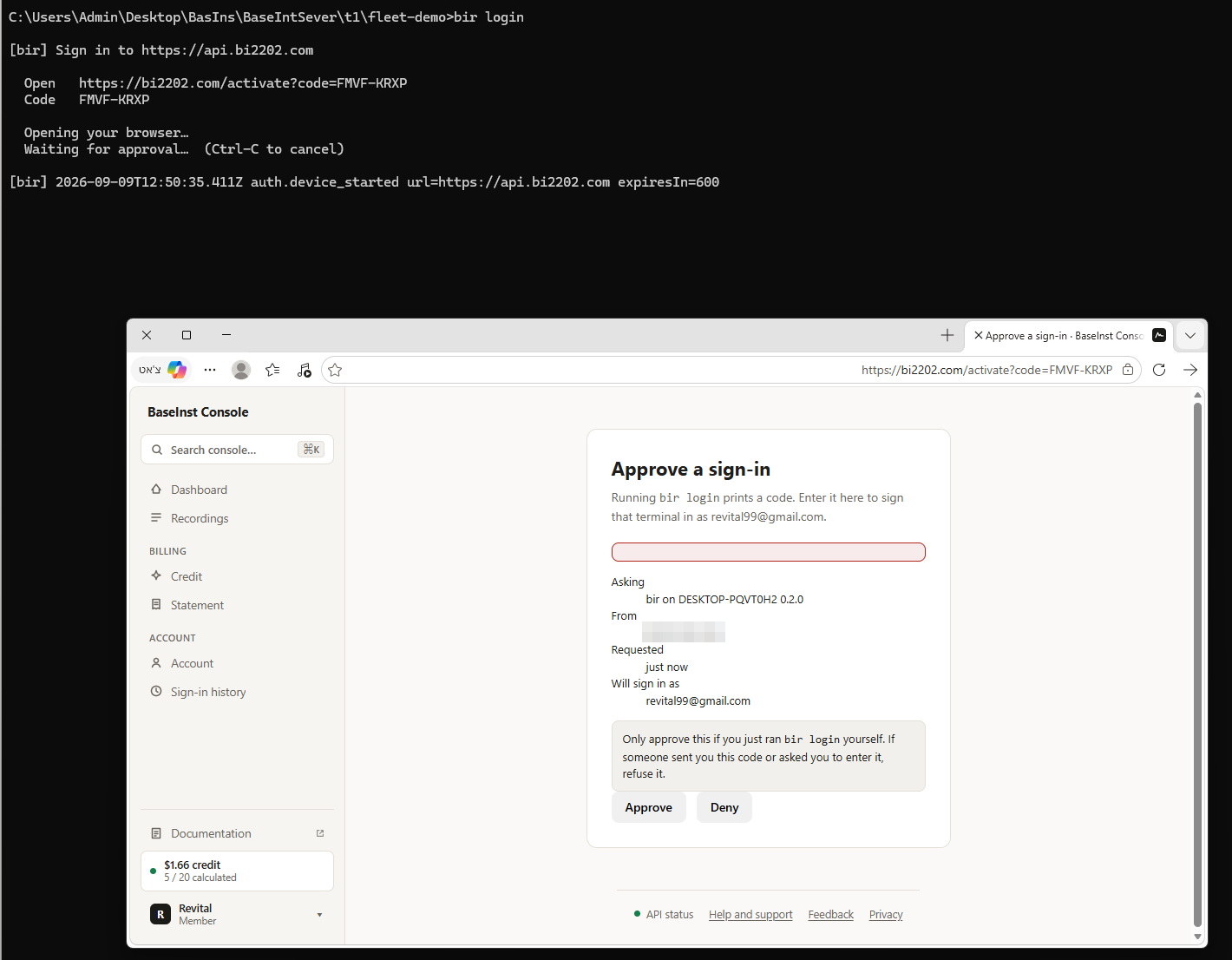
bir login, the sign-in on its own; bir setup opens the same page. The blurred line is the machine's public address, shown so you can tell your own request from someone else's; if you did not just start a sign-in, press Deny.This is the moment the runner is tied to your account. There is no account name or identifier to type anywhere: whichever account is signed in in the browser that presses Approve is the account this computer signs in as. The page says so, under Will sign in as, and the terminal confirms it on its account line. You never type a password into the terminal, which is also why this works for an account that only signs in with Google. From then on every recording from this computer goes to that account, until you run bir logout. If the page names the wrong account, press Deny, sign out of the site, sign in as the right one, and run bir setup again.
If it goes wrong. This is your home folder: unlike the line, which stops before installing anything, bir setup keeps the sign-in, and the two commands left are cd to the project and bir setup again. not a BaseIn service: the address is the website, not the API; use https://api.bi2202.com. On a machine with no browser — a server over SSH, a container — add --no-browser: it prints the address and the code, and you approve from your laptop. Prefer no browser step at all? The console's Set up the runner page makes a one-time setup token already tied to your account: bir setup --token <the token from the page>, within ten minutes.
To record another project, cd there and run bir setup again; the sign-in is kept, so the address is not needed either.
Or the pieces, one at a time. bir setup is these three, in this order. Run them yourself to see each one's output, or to redo one of them.
bir login                        # the sign-in on its own; takes --no-browser and --token too
bir install --global --replay    # wrap the project, wire the hooks, add the scenario server
bir up                           # the recorder, in the background — now, rather than with the next session
bir install gives each approved MCP server a wrapped copy in this project's local scope — every server keeps its name, so nothing the model sees changes — and wires Claude Code's hooks. Without --replay the project is recorded and replay is stored off for it. bir uninstall takes out what it added here, entry by entry, puts settings.local.json back as it was, and stops this project's recorder. A folder with no MCP servers is wired all the same: the hooks and the scenario server go in, and the summary says steer mode only.

fleet reads = already wrapped and the count is 0; on a first run that line reads + fleet → bir-proxy (local scope, over the .mcp.json entry; upstream: node) and the count is 1. Today the hooks line names .claude/settings.local.json, with --replay a line before it adds the bir scenario server, and what came after Next: — run bir-hooks in a window of its own — now reads start your session here as usual. The recorder starts itself with it; bir up starts it now, bir off --here takes it out of the way, bir doctor checks it.The switches. A replayed step runs without the permission prompt you would otherwise see, so bir replay allow names the servers you are content to have called unattended, using the names on the wrapped line; left unset, every wrapped server is eligible. The setting is kept for this project, so a recorder started by a hook keeps it; a change is picked up by the next recorder, or now with bir up --restart. Read Turning replay on in the Guide before using replay on a project that matters.
bir replay allow fleet,github    # the servers replay may call unattended (default: all wrapped)
bir replay status                # what is stored for this project (bir doctor: what the recorder runs with, and its source)
bir replay off                   # record only; no scenario answers a matching prompt
bir off --here                   # take the runner out of the way here, at once, uninstalling nothing; bir on --here undoes it
bir down                         # stop the recorder (open sessions here then show a hook error until they restart); the next session starts it again
bir uninstall                    # take the runner out of this project, and stop its recorder
What it changed on your machine
| Path | What it holds |
|---|---|
~/.baseinstrunner/config.json | the service address; BIR_AUTH_URL in the environment overrides it |
~/.baseinstrunner/credentials.json | the cached session, bound to the service that issued it |
~/.baseinstrunner/installed.json | what each entry it wrapped looked like before, with header and env values removed, plus each project's port, token and replay switches |
~/.baseinstrunner/logs/<key>.log | the recorder's audit log, one file per project |
~/.baseinstrunner/node/, npm/, bin/ | the line's own Node (only if the machine had no usable one; not on PATH), the runner package, and the bir and bir-hooks launchers, first on your user PATH. An install by hand puts the runner wherever npm does instead |
<project>/.claude/settings.local.json | Claude Code's hooks for this project. Yours, not the team's: it carries this project's token and an absolute Node path |
~/.claude.json ($CLAUDE_CONFIG_DIR/.claude.json when that is set) | this project's local scope. Each server routed through bir-proxy gets a wrapped copy under the same name, which Claude Code prefers to the .mcp.json or user-scope entry, plus the bir scenario server. .mcp.json and your user scope are left as they are |
<project>/.git/info/exclude | one line, .claude/settings.local.json, so it never shows in git status |
Each project gets its own control port (from 53411 up) and its own token, so one project's settings file cannot reach another project's recorder. Because the wrapped copy wins, a change to .mcp.json — an edit, a git pull — reaches this project only after bir setup; until then bir status marks the server STALE and bir doctor reports it.
Updating. Paste the line from the console again — the very same
line is fine, used token and all: bir setup says the setup token
was already used; keeping the sign-in from before (you@example.com) and goes
on. It installs the newest version and runs bir setup, which re-wraps
any entry whose runner moved. Not npm install -g over a one-line
install: that puts a second copy where the launchers never look. Installed by hand
in the first place? Then npm install -g @basein/runner again, and
bir setup in each project. A recorder of the older version is replaced
by bir setup, bir up or the next session's SessionStart
hook, provided no session is mid-run just then; nothing watches for a session to
end. bir setup says so when one is open (it keeps running as 0.2.12
until bir up --restart (run it once that session ends)),
bir doctor warns while it runs, and bir up --restart
replaces it.
Or bir update (runner 0.3.10 or newer). It updates the
copy that is installed, whichever way it was installed — the console line's copy
under ~/.baseinstrunner/npm, or one from npm install -g —
and refuses when it would make a second copy. It replaces the package only: run
bir setup in each project afterwards, and bir up --restart
once no session is mid-turn. Asking Claude Code to "update bir" starts the
built-in plan (the two built-in scenarios), which
stops in front of the install and leaves the update to the agent, under your
permission settings.
Coming from 0.2.12. Three things change on the way up. Wrapped
MCP calls are no longer approved by the runner: Claude Code asks about them as it
would without it, and the install prints a one-time note saying so (headless runs
are in the callout under step 3). Servers 0.2.12 wrapped in .mcp.json
or in your user scope are put back as they were and wrapped again as copies in
this project's local scope; the bir scenario server moves there too,
and its old pre-approval in settings.local.json is removed. A
.mcp.json server Claude Code has not approved yet is left unwrapped
until you approve it and run bir setup again. And a 0.2.12 recorder
still serving a session keeps 0.2.12's behaviour — it approves every wrapped
call, waits on the service in its hooks and ignores bir off — until
bir up --restart replaces it. Re-run the line, or
bir setup, in each project you set up.
Undoing it. In the project folder, bir uninstall
takes the runner out of this project — its wrapped copies, its hooks and the
scenario server, entry by entry, with settings.local.json put back
as it was — and stops its recorder; the sign-in stays, so a later
bir setup needs no token. It touches only this project, and names
the others still set up. If a session is still using the recorder it is left
running, switched off for this project: end the session, then
bir down. To remove the software, first take it out of every
project on this machine — bir uninstall --all, or the install line
with BIR_UNINSTALL=1, which downloads nothing:
$env:BIR_UNINSTALL="1"; irm https://api.bi2202.com/install.ps1 | iexcurl -fsSL https://api.bi2202.com/install.sh | BIR_UNINSTALL=1 sh
If it exits with Not everything could be undone, fix what it names and
run it again before going on. Then bir logout, so the session is
revoked on the service rather than only forgotten here; then
npm rm -g @basein/runner if you installed by hand, or delete
~/.baseinstrunner — the runner, its private Node, the launchers, the
session and the logs — and take ~/.baseinstrunner/bin off your PATH.
In the other order, every other project's wrapped servers and hooks would name
files that are gone. To go back to an older runner, run
bir uninstall --all with the current one first.
Guide
What the recorder is
bir is an MCP proxy. It registers under your
existing MCP server keys, so the model still emits
mcp__chrome-devtools__navigate_page and still gets exactly what
chrome-devtools-mcp would have returned. The difference is that
bir executed the call on the client's behalf, and wrote down
what happened.
Interception is a configuration fact, not a prompting one. The model is never asked to cooperate, and tool descriptions are never edited to steer its choices.
An MCP server sees only MCP traffic addressed to it. Bash, Read, Edit, Grep are not MCP. Neither is your prompt, the model's reasoning, or the final answer.
Which is why there are two halves. bir-proxy records MCP calls;
bir-hooks is the recorder: a hook receiver that records everything
else and owns the run. bir setup starts it in the background, and
the SessionStart hook (bir-hooks ensure) starts it again with every
Claude Code session, so nothing has to stay open.
The two tiers
| Tier | When | What ends up in the recording |
|---|---|---|
| 1 — Bound | A recorder (bir-hooks) is running for this working directory — the SessionStart hook starts one with each session | Built-ins and MCP, in one ordered step stream, with the prompt and the final answer |
| 2 — Standalone | No control server found within ten seconds; the proxy keeps looking every 15 s and binds to a recorder that starts later | MCP calls only. No prompt, no final answer, no built-in steps |
Tier 2 is not a degraded bug — it is the honest ceiling of what a proxy alone can observe, and a run records which tier produced it so nothing downstream mistakes a partial trace for a complete one. For anything beyond raw recording you want Tier 1: a match is a match on the prompt, and a standalone proxy never sees one.
Install
The beginner's path is Getting started above: the one line
from the console's Set up the runner page, or by hand
npm install -g @basein/runner and then
bir setup --auth-url https://api.bi2202.com in the project (the
address is stored from then on, so a second project needs only bir setup).
Working on the runner itself? From a checkout of
BaseInstRunnerMCP, build it and run the same setup from the
checkout. It points the install at the checkout's proxy instead of the published
package (--local, decided for you), and a later flag-less
bir install keeps that shape:
npm install; npm run build
cd C:\path\to\the\project\you\record
node C:\path\to\BaseInstRunnerMCP\dist\bin\bir.js setup --auth-url https://api.bi2202.com    # sign in, wire it, start the recorder
npm install && npm run build
cd ~/path/to/the/project/you/record
node ~/path/to/BaseInstRunnerMCP/dist/bin/bir.js setup --auth-url https://api.bi2202.com # sign in, wire it, start the recorder
The line in Getting started is the runner repository's own installers,
scripts/install.ps1 and scripts/install.sh, served by
the API with its address filled in. For a fleet of machines — packaging, offline
installs, updates — see its docs/quickstart.md and
docs/installRun.md.
bir install, the middle of bir setup, leaves
.mcp.json, the file a team commits, and your user scope as they
are. Each server it routes through the runner gets a wrapped copy in this
project's local scope — in ~/.claude.json, under
the key Claude Code uses for the project — which Claude Code prefers to the
entry of the same name, so mcp__<server>__<tool> names
never change. The copy is made only once Claude Code has approved the server,
because a local-scope server starts without its question: the order is
bir setup, approve in Claude Code, bir setup again.
bir install --server <name> wraps a pending server now, and it
then starts without the question; a server you told Claude Code not to use is
never wrapped. A remote server Claude Code signs in itself — an OAuth block, a
headers helper, ${VAR} headers — is left unwrapped, its calls
recorded by the hooks, unless --server asks for it. In a subfolder
or linked worktree of a repository only the hooks are wired, because Claude Code
keeps the local scope per repository: run bir setup in its root, and
the worktrees then run the root's wrapped servers too. The hooks go into
.claude/settings.local.json, the file Claude Code keeps out of git.
A copy remembers the entry it was made from: after an edit to
.mcp.json, a git pull or a rotated user-scope token,
bir status marks the server STALE, bir doctor
reports it, and bir setup copies it again. bir uninstall
repairs ~/.claude.json entry by entry, and puts
settings.local.json back byte for byte when nothing else has edited
it since. --mcp-json (or BIR_WRAP_MCP_JSON=1) is the old
in-place shape, for a .mcp.json nobody commits.
Then your session, now recorded:
claude
Nothing else to start. The SessionStart hook is bir-hooks ensure:
it starts the recorder for the project in the background when none is running.
bir up starts it by hand; bir down stops it, and leaves
the hooks, so a session open there shows a hook error on every prompt and tool
call until it ends. To take the runner out of the way instead,
bir off --here (When it goes wrong, below). Whenever you
want to know where you stand:
bir status    # what is wrapped (and STALE), which config scope won, whether the runner is on, and where the audit log is
bir doctor    # is it working right now — exits 1 only for what breaks a session here (--strict: warnings too)
doctor is the one to trust. status tells you what is
configured; doctor tells you whether a proxy can currently reach
a control server — which is the difference between Tier 1 and Tier 2 — and
which service and account the recorder records to (recording to … as …),
with its pid and its log. It sorts what it finds into problems, which break a
session here (exit 1), warnings, which sessions work through (exit 0, or 1 with
--strict), and notes; --quick does not call the
service. recorder not running before the first session is normal: the
next session starts it.
For other MCP clients, nothing in bir knows where Cursor or Codex
keep their settings, and it does not guess:
bir install --config <path>, or
bir wrap --server-name my-server -- node my-server.js to print an
entry to paste. Those clients have no hooks, so they record at Tier 2.
An agent you built yourself with LangChain is set up in
another way: no bir install, and a small Python package inside
your application. It has a section of its own,
For a LangChain agent. Its runner side is out; the
Python package is not on PyPI yet.
Record a run worth keeping
Work normally. Two server-side facts decide whether the run becomes reusable, and both bite quietly.
A run needs more than three tool actions — or a repeat. Below that it does not appear in the list and is eventually pruned. It is still embedded and matched: repeat its prompt and the repeat lands as a similar hit on it rather than as a second run, and one such hit lists it, however short it is. Only a run with no tool actions at all stays out of the pool.
The prompt is what gets embedded — the text you typed, not the transcript and not the answer. Write the first prompt of a reusable task as though someone else will have to phrase it again next month, because that is exactly what has to happen.
Watch it land in the audit log:
[bir] …  run.start   run=run_… sess=birsess_… tier=bound
[bir] …  run.finish  run=run_… steps=14 durationMs=48210 lossy=false recorded=true
recorded=false means the service declined the run — usually
because it matched something you already have, which is similarity detection
working. Every decision is one key=value line, and the background
recorder writes them to ~/.baseinstrunner/logs/<key>.log, one
file per project; bir status and bir doctor name the
file, and so did the log line of bir setup's summary. There
is no terminal to watch, so follow the file:
Get-Content -Wait -Tail 20 $HOME\.baseinstrunner\logs\<key>.logtail -f ~/.baseinstrunner/logs/<key>.log
A bir-hooks run by hand in a terminal, which still works, prints
the same lines there instead — on stderr, never stdout, which
belongs to the host's JSON-RPC stream.
Calculate, then check
bir scenario list             # what you have
bir scenario calc run_5f3a…   # start the background job
bir scenario show run_5f3a…   # poll until state leaves `calculating`
failed carries an error field; fix what it points at
and recalculate with --force. Or do all of this from the console's
recording detail page, which is the same API with the results laid out — with
one exception: the console has no Recalculate button, so a failed calculation is
run again there by preferring the recording.
Or do nothing. Once a prompt has come back three times
(SCENARIO_AUTO_MIN_HITS) and the run it keeps matching passed end
to end — it finished without an error and no tool call in it failed — the
service calculates the recording with the most to save by itself, and the
console marks it auto. A run has to have been quiet for ten
minutes first (SCENARIO_AUTO_SETTLE_MS): a session that has
just finished is often still sending steps. It never deletes anything and
never retries a failed calculation, and it works through one calculation at
a time per account.
Or say which ones to leave alone: press Switch off the
whole scenario on a recording's page and the picker never chooses it,
however often its prompt comes back, and a matching prompt is not replayed
from it either — though you can still calculate it
yourself. Or say which one you want: press ☆ Prefer
this recording on its page. It is calculated straight away and takes
nothing from anything else you hold. SCENARIO_AUTO_CALCULATE=false
leaves calculation entirely to the button.
Dry-replay before you trust it. It derives parameters from a new prompt and evaluates the stored logic against the recorded outputs — no real tool is called, nothing is billed, and it is the cheapest way to find out that step 3 computes an argument you did not expect.
bir scenario replay scn_9c1b… --prompt "check the us-east-2 fleet" --dryIf the dry replay shows a step working out the wrong thing, you do not have to recalculate the whole scenario. That one step can be corrected: see Let Claude fix a step, below (runner 0.3.0 or newer).
Turning replay on
Recording is the default. Calculated replay is installed and on as well, once
bir setup has run: it added the bir scenario server to
this project's local scope in ~/.claude.json, where Claude Code does
not ask about it, and said so at the end of its wiring step:
Wrapped 1 server.
Next: start your session here as usual. The recorder starts itself with it;
`bir up` starts it now, `bir off --here` takes it out of the way, `bir doctor` checks it.

Calculated replay is INSTALLED and ON. `bir replay off` turns it off here, and
`bir replay allow <servers>` narrows what it may call unattended — read
docs/calculatedReplayGuide.md §5.1 first: a replayed step is auto-approved,
and a directly executed one never reaches the permission system at all.
The switches are per project, stored so a recorder started by the hook keeps them; a running recorder reads a change when it restarts:
bir replay allow fleet,github   # the servers replay may call unattended (default: all wrapped); `allow all` widens it again
bir replay off                  # record only; `bir replay on` brings it back
bir replay status               # what is stored for this project
bir up --restart                # apply a change now, rather than with the next session
By hand, on a project wired without it: bir install --replay adds
the server to the local scope and turns replay on (a flag-less
bir install keeps the way the project was installed — global, local
or npx; bir install --replay never turns back on a
bir replay off of yours), then bir up --restart.
A scenario is a pre-approved list of tool calls with computed
arguments. A steered step is answered
permissionDecision: "allow", so a pinned Bash or
Edit runs without the prompt you would otherwise have seen —
only for a call that plausibly is that step: the same command, the same
file, the same kind of arguments. Any other call is asked about as usual,
and nothing is approved in plan mode. A directly executed step never
reaches the permission system at all. With runner 0.3.8 or newer that
includes Claude Code's own Read, Glob,
Grep, Edit, Write and
Bash: the runner runs those steps itself, from the project
folder, any Bash command included. From runner 0.3.21 the
file tools reach any file the agent could, outside the project folder
too.
Run bir replay allow with the servers you are content to have
called unattended. Leaving it unset means every wrapped server is
eligible, and that is not the setting you want. Where a wrapped server does
things you would not want done unattended, bir replay off until
you have dry-replayed and read the scenarios. For Claude Code's own tools,
BIR_BUILTIN_TOOLS names the ones the runner may run
(Read,Glob,Grep to only read, none for none),
BIR_PATH_ALLOW the folders its file tools may touch
(project for the project folder alone) and
BIR_BASH_ALLOW the commands (for example
git,npm test), set where the recorder starts.
When a step cannot run. A step that fails, times out, or that
its server refuses stops the plan there: the model reads a
[BaseInstRunner calculated replay] hand-over note naming the steps
that ran, and carries on with the task itself. A recorded output never stands
in for a step that could not be sent (BIR_REPLAY_RECORDED_OUTPUTS=1
opts back in, for those steps only). A fully wrapped plan runs only through
run_scenario, the one tool the bir server lists by
default, and only while that server is connected in the session; a note tells
the model when to call it, and it never returns an error — with nothing to run
it answers Nothing to run for this request; continue normally. A plan
is looked for mid-task, from the model's reasoning rather than the prompt,
only when BIR_INTENT_ARM=1 is set where the recorder starts;
unset, nothing is looked for or sent mid-task.
What it costs your session
With replay on, a prompt waits for the service's match: usually 0.3–0.5 s, at
most 3 s (BIR_MATCH_BUDGET_MS); when the match has a scenario whose
values must be read from the prompt, the whole wait is up to 7.5 s (runner
0.3.11; 6 s before), and a plan ready only after that is dropped — a runner of
0.3.11 or newer reports it as arm_timeout. It does not wait while the service
is failing — the first failure opens a breaker, and hooks stop waiting on the
service until it answers again — and after a match slower than 2 s
(BIR_MATCH_SLOW_MS) prompts stop waiting for 5 minutes, doubling to
30 while the service stays slow; a fast match ends the hold. A match answered
too late is not used, and a runner of 0.3.12 or newer reports it as
match_late. Tool calls never
wait on the service. bir replay off removes the prompt wait
altogether. The hooks themselves carry timeouts, written by
bir install: 15 s for SessionStart, 10 s for a prompt, 15 s for
PreToolUse, 5 s for PostToolUse and Stop, 3 s for SessionEnd and sub-agents.
The recorder answers each route well inside its timeout and finishes whatever
was still running in the background.
Configuration
The switches above are stored per project and are the reliable way. The
variables below override them where the recorder is started from — for one
started by the SessionStart hook that is Claude Code's environment, not your
terminal's, so a variable set in one terminal is not seen. Most are read by the
recorder; the last rows say when another process reads them.
bir doctor says which won (source=env,
sidecar or default).
| Variable | Effect |
|---|---|
BIR_AUTH_URL | The Basic2202 service's API address. Overrides the one bir setup stored in ~/.baseinstrunner/config.json. Neither set means nothing is recorded — everything else still works |
BIR_OFF=1 | The off switch for one Claude Code window: set where Claude Code starts, that window's hooks answer nothing, its wrapped servers run as plain pipes and its bir server lists no tools; other windows keep recording. bir off switches off every project on this machine, bir off --here one project, and bir on undoes either |
BIR_CONTROL_PORT | Preferred control-server port (default 53411). Each project has its own; bir setup --port <n> is the way to change it |
BIR_CORRELATION_DECISION | Unset (the default): the runner approves nothing, and Claude Code asks about wrapped MCP calls as it would without it. allow: the recorder approves every wrapped MCP call, as 0.2.12 did, for headless runs that cannot answer a prompt. ask: carries a call id and keeps the prompt. Read by the recorder: set it where Claude Code starts, then bir up --restart |
BIR_HOME | Where state lives (default ~/.baseinstrunner) |
BIR_VERBOSE=1 | Per-message detail in the audit log |
BIR_REPLAY=0 | Turn replay off. It is on once bir setup has run; bir replay off is the per-project way, and this overrides it |
BIR_REPLAY_ALLOW_SERVERS | Server keys eligible for direct execution; overrides bir replay allow. Unset means the stored list, else every wrapped server |
BIR_MATCH_BUDGET_MS / BIR_MATCH_SLOW_MS | How long a prompt waits for the match (default 3000), and the match time past which prompts stop waiting for 5 to 30 minutes (default 2000) |
BIR_REPLAY_RECORDED_OUTPUTS=1 | Let a step's recorded output stand in when the step could not be sent. Unset, the plan stops at that step and hands the task back |
BIR_INTENT_ARM=1 | Let a plan found mid-task, from the model's reasoning, arm and run. Unset, nothing is looked for mid-task |
BIR_DERIVE_API_KEY | Optional. Working out what a new request is about — which fleet, which week — is done for you by the service on its own key while the runner is signed in. Set this (an Anthropic key) where Claude Code starts, only to keep that reading on your machine, on your key |
BIR_USE_ANTHROPIC_API_KEY=1 | Let the background recorder use an inherited ANTHROPIC_API_KEY for that reading. Without it the recorder removes the key from its environment and logs derive.api_key_ignored, so nothing is billed to it; a bir-hooks run by hand in a terminal uses that terminal's key as before |
BIR_SCENARIO_TOOLS=read | Read by the bir server: list its three reading tools (scenario_show, scenario_edits, investigate) where scenario editing is off |
BIR_PROXY_STAY_UP=1 | Read by bir-proxy: keep answering errors after the wrapped server dies, as 0.2.12 did. Unset, the proxy exits with the server, so Claude Code shows it as failed and offers a reconnect, as it would unwrapped |
--mcp-json / BIR_WRAP_MCP_JSON=1 | Read by bir install: the old shape, wrapping .mcp.json servers in place and putting the scenario server there. Only for a .mcp.json nobody commits |
When it goes wrong
The governing rule is that a host session never fails because of BaseInstRunner. Every failure degrades to passthrough or to not-recording.
bir off first. It takes the runner out of the way at
once, in every project, and uninstalls nothing: hooks answer with nothing within
about a second, in sessions already open too, and nothing is recorded, replayed
or sent; wrapped MCP servers run as plain pipes to the real server from their
next start (a new session, or /mcp → reconnect), and stop recording
until then; the bir server lists no tools. If the problem goes away,
the runner was the cause; if it stays, the runner is ruled out. Not
bir down: it leaves the hooks, and an open session then shows a hook
error on every prompt and tool call.
bir off --here    # this project only; from a subfolder, the project it is in
bir on --here     # undo it: hooks and running wrapped servers record again within about a second
bir off           # every project on this machine; `bir on` undoes it, project switches included
BIR_OFF=1 in the environment Claude Code starts in does the same for
that one window, and no other. A 0.2.12 recorder ignores the switch:
bir off replaces one no session is using and names any other, which
bir up --restart replaces once its session ends.
| Symptom | Cause | Fix |
|---|---|---|
| Nothing appears in the console | Not signed in, or no service address stored | bir setup in the project folder (or bir login on its own); a running recorder records from the next prompt. Check bir doctor |
| A hook error on every prompt and tool call | The recorder was stopped (bir down), its port changed or is held by another program, or its Node or script is gone | bir doctor names which; bir up, or bir setup. To silence the hooks on purpose: bir up, then bir off --here |
A server keeps its old configuration after .mcp.json changed | The wrapped copy in this project's local scope outranks .mcp.json | bir setup; bir status shows the server as STALE until then |
Calls to a wrapped server are denied under claude -p | The runner no longer approves wrapped MCP calls, and nothing headless answers the prompt | permissions.allow in a trusted workspace or --allowedTools; or BIR_CORRELATION_DECISION=allow where the recorder starts, then bir up --restart |
tier: standalone | No recorder running for this cwd — the hook starts one with each session, so this is a session that began before bir setup, or a recorder that was stopped | bir up in the project folder, or start a fresh session; bir doctor says whether one runs |
| Recorded, but not in the list | Three actions or fewer | Nothing to fix — below the threshold on purpose |
recorded=false | The service matched it to an existing run | Working as intended |
The recorder's log has a recorder.send_failed line with HTTP 429 | The service takes at most 120 runs and 3,000 steps a minute from one account (RECORDING_RUNS_PER_MINUTE and RECORDING_STEPS_PER_MINUTE, at their defaults). A tool call is two steps: the call and its result. An ordinary session does not come near | The runner sends a refused run or step once more. A step that was refused twice is missing from its recording. A run that was refused twice is not recorded, and a run that was refused once goes on without its plan. If it happens in ordinary use, the limit is too low for you: write to us from the console's Help and support |
| No prompt ever matches | Similarity detection off, or the prompts really are different | Check SIMILARITY_DETECTION_ENABLED; re-read the prompt you wrote |
| Calculate returns 503 | No Anthropic key on the server | Server-side configuration |
Sample — the fleet demo
A complete run-through against a real MCP server, on your machine, with no
cloud resources and no money spent. About ten minutes. It uses the
fleet-demo folder you built in step 2 of
Getting started: a tiny but genuine MCP server over
stdio, with two tools.
list_devices(fleet) → the fleet's devices, with risk scores
device_detail(id)   → one device's detail
Step 2 can only compute its id argument from step 1's
output. That makes this the smallest honest test of whether scenario
calculation actually works, rather than the smallest test that passes.
The task: "check the eu-west-1 fleet and tell me which device is most at
risk" — which resolves, in the sample data, to dev_88f1:
edge-01, risk 0.94, firmware 3.1.2.
Set up the project
This is the
fleet-demofolder from step 2. If you have not built it yet, go back and do that first — two files and a minute. If you ranbir setupin it there, it is already wired: skip to step 2. Otherwise, in the folder:cd fleet-demo bir setupThe sign-in from Getting started is kept on this computer, so no token and no address are needed.
bir setuproutesfleetthroughbir-proxywith a copy of its entry in this project's local scope, once Claude Code has approved it (startclaudeonce, say Yes tofleet,/exit, thenbir setup; run before that, it saysfleet — left unwrapped), writes Claude Code's hooks into.claude/settings.local.json(kept out of git), adds thebirscenario server to the same local scope, where Claude Code does not ask about it, and starts the recorder in the background; the copy and the hooks are generated for your machine, absolute paths and control-server port included, and.mcp.jsonis left as you wrote it.bir uninstalltakes it all out again, entry by entry, and stops the recorder. Replay is on from here, so step 7 needs no second install.Check the recorder
Nothing to start:
bir setupstarted the recorder, and the SessionStart hook starts it again with every Claude Code session in this folder. In the same folder,bir doctorshould saybound (Tier 1)andRecording: yes; recorder not running before the first session is normal — the session starts it, orbir upnow. If it readsstandaloneduring a session, the recorder and the session disagree about either the working directory or the port — the only two things discovery matches on.Record the run
In the same terminal, same folder, start Claude Code and ask it the task:
claudeAsk for "check the eu-west-1 fleet and tell me which device is most at risk". Claude Code asks before the first
fleetcall, as it would without the runner; say yes. The two tool calls land in the audit log —~/.baseinstrunner/logs/<key>.log, the filebir doctornames — then arun.finishline.Look at it in the console
Recordings holds the run with its generated title, step count and cost. This is the baseline: what the task costs when the agent does it.
Calculate the scenario — and read it
bir scenario list                 # find the run id
bir scenario calc run_…
bir scenario show run_…
Read what comes back before going further. You are looking for three things:
- an intent that describes the task, not the specific fleet;
fleetas a parameter witheu-west-1as its sample value — if the region is baked into a step's logic, the scenario only ever answers one question;- step 2's logic reading step 1's output to pick the highest-risk id. A scenario that hard-codes
dev_88f1looks identical on a green run and is wrong the moment the data moves.
Dry-replay against a different fleet
bir scenario replay scn_… --prompt "check the us-east-2 fleet" --dryThe derived parameter should be
us-east-2. Since a dry run evaluates against recorded outputs, step 2 still picks from the eu-west-1 devices — correct behaviour. The dry run prints aparamsline, then each step asstep N <tool> <input>with what it→ emitted:for the next one, then theresponseand thecost. What you are checking is the parameter derivation and the step logic, not the answer.Replay it for real
Replay has been on since
bir setup. Narrow it to thefleetserver — the only one this scenario needs — and let the recorder read the change:bir replay allow fleet bir up --restartThen start
claudeagain and ask for "check the us-east-2 fleet and tell me which device is most at risk".Now the tools are really called.
us-east-2's highest-risk device isdev_4411—core-01, risk 0.77. That is the proof the scenario computed the answer rather than remembering it.Read the ledger
Back in the console, check three things: Saved $ is populated and the baseline's ⓘ says how many runs it is drawn from (on a first pass, one — and one sample is a guess); the headline moved under verified, not projected; and the scenario is not flagged as not paying off. Saved $/% is the same verdict per run at a glance — a green bar is a cut, a red one is a loss. On a two-step task against a local server the arithmetic is tight — on real work with real latency it is not.
The second sample. There is another demo of the same shape
with a longer chain — list_services,
service_metrics, error_logs,
recent_deploys, dependency_graph. It lives in the
runner repository, which is not public, so it is not something you can fetch
today; the point of it survives without it. Extend the fleet server
above until it has five tools, at least one of them needing an
argument computed from an earlier step's output. That is worth doing once the
fleet demo works, because a five-step scenario is where the interesting
failures start: a step whose logic reads the wrong earlier output
looks fine on two steps and falls apart on five.
Ask why — did my task use its calculated scenario?
Once a task has been recorded and replayed a few times, three questions come
up: did this run use the calculated scenario, and if not, why?
How much did it save, and why not more? What happened, step by
step? The runner answers all three with one command,
bir investigate, and Claude Code can run it for you and explain
the answer in plain words. Every finding names the problem, the cause and
the fix. Steps 1 to 4 below only read. Step 5 lets Claude fix one step of
the scenario, after your yes (runner 0.3.0 or newer).
The recorder keeps a journal of every decision it makes in
a folder — which recording a prompt matched, which gate declined and why,
whether the plan ran in direct or steer mode, what
the run cost. The service adds the recording, the scenario, the baseline
and the ledger. You see your own data; an admin sees everyone's.
Do a task twice
In a folder the runner is set up in, ask Claude Code for a task, let it finish, then ask for the same task again. The second time the audit log (
~/.baseinstrunner/logs/<key>.log) gets arun.matchedline, and eitherplan.armedorreplay.decision verdict=no-steer. That second turn is what you are about to investigate.Ask Claude Code why
Do this. In the same Claude Code session, in the same folder, paste:
Run `bir investigate` in this folder and explain in plain words:
did my last task run its calculated scenario, and if not, why?
If it did, how much did it save and why not more?
List the fixes it suggests. Do not run any fix — just report.
You should see Claude run the command and report on it. The command's own output looks like this (a real run from the fleet demo):
Turn run_0544…  2026-09-20 12:19:18Z  session e5b66bfb
  prompt    Give me a full detail report for every device in eu-west-1
  matched   run_be1c… (similarity 1.000) → scenario scn_4641…
  plan      steer, 4 steps  Bash:live Bash:live Bash:live Bash:live
  replay    steered_full 4/4 steps in 27.3 s
  reported  steered_full  derive $0.0004  session $0.4482  fallback $0.0000  → saved $0.0910 (16.9% of $0.5396)
  finished  8 steps, 33.6 s, cost $0.4482, not recorded

Runner findings
  1. [warn] The plan armed in steer mode: 4 of 4 steps are reachable only inside the session (Bash).
     why:  In steer mode the runner pins each call's inputs … the whole live turn is still paid for.
     fix:  Put the data those tools reach behind an MCP server, wrap it (`bir install --server <name>`) …
  2. [warn] Saved 16.9%: $0.0910 of a $0.5396 baseline.

From the service (execution sexec_…), owner you:
  recording run_be1c…  listed, embedded  4 tool calls (Bash)  cost $0.5397  hits 5
  scenario  scn_4641…  ready  4 steps (Bash)  baseline $0.5397 from 1 sample(s)

Service findings
  1. [warn] 4 of 4 steps use built-in tools (Bash), so this scenario can only run in steer mode.
  2. [info] The baseline is one run ($0.5397), so every percentage is against that single measurement.
Claude's summary of that would be: the task did use its scenario, but in steer mode, because every step is a Bash command; the model still paid for the whole turn, so it saved 17%. To save more, put the fleet data behind an MCP server and wrap it.
That run was on a runner older than 0.3.8. From 0.3.8 on, the runner runs Bash steps itself unless
BIR_BUILTIN_TOOLSleaves Bash out, so the same scenario runs in direct mode, where the model makes no tool call.If it goes wrong.
No turns in the journal for this directory: the recorder was not running in this folder when the task ran —bir doctorsays whether it is now; run the task again once it is — or the runner is older than this feature: paste the line from the console again (npm i -g @basein/runner@latestonly if you installed by hand) and check thatbir --helplistsinvestigate.service not consulted: not signed in — run `bir login`: the runner is not signed in on this computer;bir setupin this folder signs it in (orbir loginon its own).the service has nothing for …: the run belongs to another account, or the service is older than the runner.Ask about one run, or about the money
The same command takes an id, so Claude can be pointed at a specific run, scenario or execution. Useful prompts:
- "Run
bir investigate listand tell me which turns were steered and what each saved." - "Run
bir investigate scn_…and explain why the saving is low and how to fix it." - "Run
bir investigate executions --jsonand show me the executions that failed, with the step that broke." - "Run
bir investigate run_…— why was this recording never calculated?"
Everything Claude runs for these prompts only reads: it changes nothing. When a finding says fix: recalculate or fix: wrap the server, that is a command you choose to run next — or ask Claude to. To let Claude change a step of the scenario itself, see step 5.
- "Run
Without Claude Code
The command works on its own in any terminal in the folder, with the recorder running or not:
bir investigate                        # the newest turn in this folder
bir investigate run_… | scn_… | sexec_… # one run, scenario or execution
bir investigate list --limit 10         # recent turns and their verdicts
bir investigate executions              # the ledger, newest first
bir investigate executions --user ada@example.com   # admins only
Add
--jsonto any of them for the raw data.
| The finding says | It means | Fix |
|---|---|---|
declined_not_ready | the prompt matched a recording that has no ready scenario yet | wait for the automatic calculation (three similar prompts), or bir scenario calc run_… |
declined_similarity | the prompt matched, but an older runner (0.3.6 or before) wanted a closer match of its own before using the scenario | update the runner: npm install -g @basein/runner, then bir up --restart |
declined_coverage | none of the scenario's tools is reachable in this session | bir install --server <name>, start a fresh session |
arm_timeout / arm_unannounced | the plan was ready only after the prompt had to be answered: reading the prompt's values took too long (reported by runner 0.3.11 or newer; older runners give no reason) | run it again; if it keeps happening, the reading is slow on the service |
match_late | the service said which recording the prompt matches only after the prompt had been answered, so no plan was started. The answer was slow, or the runner did not wait for it because its last request to the service had failed (reported by runner 0.3.12 or newer; with an older runner the Recordings list says "no report yet") | run it again a few minutes later; if it keeps happening, bir doctor on that machine shows whether the service is slow or cannot be reached |
steer_mode / steer_only | some steps are built-in tools (Bash, Read…), so the model still runs the whole turn | put that data behind an MCP server, wrap it, record the prompt again |
saving_low / saving_negative | the replay cost most of, or more than, the baseline | the finding names the dominant cost — session, fallback or derivation — and its fix |
baseline_single | the % is against one measured run | let the agent run the task a few times unsteered (bir replay off, then bir up --restart; bir replay on afterwards) |
run_below_threshold | fewer than four tool calls, so the run is not a recording | record a longer task, or mark it preferred |
awaiting_hits | 2 of 3 similar prompts so far | run it once more, or calculate now |
execution_failed / fell_back | a step broke, and where | the fix for that stage: recalculate, check the tool, check the target |
step_nondeterministic | a step needs a judgement: its code could not work out what to send, so every replay hands over to the agent in front of it | recalculate once (bir scenario calc scn_… --force, with the id the finding prints; it adds --discard-edits when steps were edited by hand); if it is still marked, fix the step (step 5). A step you marked yourself (--freeze) is unmarked with bir scenario edit scn_… --step n --unfreeze |
step_edited | a step's code or mark was changed by hand, with bir scenario edit | nothing to fix. bir scenario edits scn_… shows the change; bir scenario undo scn_… --step n takes it back |
step_edit_forced | a step was saved with --force, although its check against the recording failed | read the note with bir scenario edits scn_…; take it back with bir scenario undo scn_… --step n, or save a version that passes the check |
Let Claude fix a step
Runner 0.3.0This needs runner 0.3.0 or newer; the service answers it. A runner of version 0.2.10 or older does not know
scenario check, and 0.2.11 has an early form of it that is not what this section describes. Paste the line from the console again (installed by hand:npm i -g @basein/runner@latest, thenbir setup), and check thatbir --helplistsscenario check.Sometimes a finding is about one step of the scenario. The most common one is
step_nondeterministic: Step 4 (mcp__postgres__execute_sql) needs a judgement, so runs hand over in front of it. Every replay then stops before that step and the agent does the rest, so the saving from that step on is lost. Often the cause is a small mistake in the step's code, and Claude can fix it.A step's code is a few lines of JavaScript that work out what the step sends. In the hiring-year task of 2026-09-25, step 4 had this code:
return {"sql":"SELECT * FROM employees.hiring_year_summary ORDER BY hire_year;"};That is a copy of the old command. It sends the same table every time, whatever the new request says. The fix builds the command from the request:
return { sql: "SELECT * FROM " + parameters.summary_table + " ORDER BY hire_year;" };The service tries every change against the recording before it keeps it. It saves the change only if the new code, given the recording's values, makes the same call the recording made, and is not just a copy of it like the old code above. Only you can change your scenarios: not another account, and not an administrator.
The new code runs at replay without asking you, exactly like the code the calculation wrote. The check looks only at what the code sends for the recording's values. Code that does something more in another case (for example, reads a file or calls a website only when a value is different) can still pass the check. So read the code before you say yes (What runs without asking you, the last point).
Do this. In the same Claude Code session, in the same folder, paste:
First run `bir investigate` in this folder; that only reads.
If a step needs a judgement, or works out the wrong input, fix that step:
1. Read it with `bir scenario show <scenario> --step <n>`.
2. Write the corrected input logic to a file.
3. Check it: `bir scenario check <scenario> --step <n> --input-logic <file>`.
   Show me what the check printed, and wait for my yes.
4. Only if the check says "reproduces the recorded call", save it:
   `bir scenario edit <scenario> --step <n> --input-logic <file> --note "<why>"`.
Always give --note. Never use --force. If the check refuses the change,
tell me why, fix the code and check again.
You should see Claude run
bir investigate, thenbir scenario show, then the check.bir scenario showprints the step's code, with the scenario's id and itschainRevisionat the top. The check prints this:Step 4 (mcp__postgres__execute_sql) — checked against run_67afb010-… input reproduces the recorded call later not affected: only the input logic changed mark needs a judgement (input_mismatch) → runs by itself Nothing saved. To save: bir scenario edit scn_4a17a126-… --step 4 --input-logic step4.jsIn plain words:
input reproduces the recorded call: given the recording's values, the new code makes the same call the recording made. This is the test that matters.later not affected: only the code that works out what this step sends has changed. The steps after it use what this step gets back, and that did not change. (When a change can reach the later steps, the check tests them too, and the final answer.)mark … → runs by itself: the step no longer needs a judgement. Replays will run it instead of handing over to the agent.Nothing saved: a check never changes anything.
When you say yes, Claude saves it:
Step 4 (mcp__postgres__execute_sql) — checked against run_67afb010-…
  input    reproduces the recorded call
  mark     needs a judgement (input_mismatch) → runs by itself
Saved as sedit_633dba0d-bbbe-4517-ac29-74cc85a3abda (revision 2). Undo: bir scenario undo scn_4a17a126-… --edit sedit_633dba0d-bbbe-4517-ac29-74cc85a3abda
From then on, replays no longer hand over in front of that step. (A replay still hands over at an earlier step that needs a judgement. In the hiring-year task step 3 did too, and it was fixed the same way.)
bir investigatenow says the step was edited by hand (step_edited), and the console shows an edited by hand badge on the step.A change that does not pass is not saved. The check says where it differs. Here the new code put the schema name in twice (
employees.employees):Step 4 (mcp__postgres__execute_sql) — checked against run_67afb010-… input differs from the recorded call at character 32 computed … FROM employees.employees.hiring_year_summary ORDER BY h… recorded … FROM employees.hiring_year_summary ORDER BY hire_year;"… later not affected: only the input logic changed mark needs a judgement (input_mismatch) → stays marked Nothing saved, and `bir scenario edit` would refuse it: the change does not reproduce the recording. Fix the code and check again. If the recording itself was wrong, edit can save it on purpose: add --force --note "why".To undo it.
bir scenario edits scn_…             # every change: when, which step, and the note
bir scenario undo scn_…              # take back the newest change
bir scenario undo scn_… --step 4     # take back the newest change of step 4 only
Undo walks back. Run
bir scenario undoagain, and it takes back the change before that one. Keep going, and the steps get the calculation's code back. In the hiring-year task, step 3 was fixed the same way, after step 4. Two undos took back step 3, then step 4:$ bir scenario undo scn_4a17a126-… Step 3 (mcp__postgres__execute_sql) — checked against run_67afb010-… input back as it was before that edit mark runs by itself → needs a judgement (input_mismatch) Step 3 is back as it was before sedit_02cb1210-1938-4902-9395-5a82b321276d (revision 4). Redo: bir scenario undo scn_4a17a126-… --edit sedit_1bcba735-a526-4a1c-a890-261addf2d82b One further back: bir scenario undo scn_4a17a126-… $ bir scenario undo scn_4a17a126-… Step 4 (mcp__postgres__execute_sql) — checked against run_67afb010-… input back as it was before that edit mark runs by itself → needs a judgement (input_mismatch) Step 4 is back as it was before sedit_633dba0d-bbbe-4517-ac29-74cc85a3abda (revision 5). Redo: bir scenario undo scn_4a17a126-… --edit sedit_8d3da392-1d96-4b2e-8c5d-34f8ab668b53 One further back: bir scenario undo scn_4a17a126-…To bring a change back, run the
Redo:command. It undoes the undo.An undo is checked like a change. If taking a change back would break a later step or the final answer, the undo is refused, and nothing changes. You can undo it anyway with
--force --note "why". That is your decision, not Claude's.Claude's
birtools. Claude can always runbirin its terminal, where you see each command. Thebirserver in Claude Code also gives Claude the same actions as tools: three that only read (scenario_show,scenario_edits,investigate) and three that change a scenario (scenario_check,scenario_edit,scenario_undo), besiderun_scenario.With runner 0.3.5 or newer,
bir setupturns all of them on, and Claude Code uses them without asking you. One thing still asks you first: a change Claude wants to force past the check (force). That is your decision, not Claude's.Each tool Claude is offered adds a little to every request, so you can take the six away in a project. A later
bir setupkeeps them away there. With an older runner, or in a project set up withbir install, they are off until you turn them on:bir scenario editing status # is it on here? bir scenario editing off # take the six tools away bir scenario editing on # give them backThen quit Claude Code and start
claudeagain. A session that is already running does not see the change.BIR_SCENARIO_TOOLS=readin thebirserver's environment offers just the three that read.The fixing is never recorded. The runner does not record its own
birtools: thebirserver's tools (exceptrun_scenario), and terminal commands (Bash or PowerShell) that only runbir. So a session that fixes a plan does not become a scenario of its own. A command that mixesbirwith other work, such asnpm test && bir investigate, is still recorded.What a recalculation does to a fix. A recalculation builds every step again from the recording, so it would throw the fix away. So it refuses:
$ bir scenario calc run_67afb010-… --force
Not recalculated: steps 3, 4 were edited by hand, and a recalculation rebuilds every step.
  To recalculate anyway and discard the edits: bir scenario calc run_67afb010-… --force --discard-edits
  (the edits stay in `bir scenario edits`, marked replaced)
Add
--discard-editsonly when you want the calculation's code back. You can also give the scenario's own id:bir scenario calc scn_… --force --discard-edits. That works for every scenario. The service's own automatic repair also leaves a scenario with edits alone, andbir investigatesays so (repair_skipped_edits).Saving on purpose. Sometimes the recording itself was wrong, and no correct code can match it. Then you can save the change anyway, with
bir scenario edit … --force --note "why". If the check found any problem, the save is marked as forced. The step shows accepted on purpose, andbir investigatekeeps saying so (step_edit_forced). Do this yourself, after you have read the code. Do not leave it to Claude.If it goes wrong. Each point but the last starts with words that
birprints.usage: bir scenario <list|show|calc|replay> …afterbir scenario check. Your runner is older than 0.3.0. Paste the line from the console again (installed by hand:npm i -g @basein/runner@latest, thenbir setup).the change does not reproduce the recording. The new code makes a different call. Claude should compare thecomputedandrecordedlines, fix the code, and check again.is a copy. The code returns the old values whatever the new request says. It would do the old job every time, so it is refused. The code must use the request's values (parameters) or what earlier steps returned.too costly to check. Checking the code took more than its time (5 seconds of running code, at the default). Make the code do less, and check again.Nothing would change(from a check) orNothing to change(from an edit). The step already has this code. Nothing to do.(revision_changed). The scenario changed since Claude read it. Read the step again, and check again.(not_ready)or(scenario_calculating). The scenario is not ready, or a calculation of it is running. Wait for it to finish, then check again.(rate_limited). More than 30 checks, edits and undos in a minute. Wait a minute.(not_found)ornot yours. The id is wrong, or the scenario belongs to another account.(logic_sandbox_unavailable). The service could not run step code just then. Nothing was checked, saved or undone. Try again in a minute.(invalid_input). Something in the request is not valid, for example code over 20 000 characters or a note over 500. The words after it say what.(payload_too_large). The request is far too large. A step's code may be at most 20 000 characters, and a note 500.Not undone:withafter this undo. Taking the change back would break a later step or the final answer, so it was refused. The message names what would break. Fix or undo that first, or leave this change as it is.(not_latest_edit). A newer change of the same step came after it.birprints two commands: run them in that order.(already_undone). That change was taken back already. To bring it back, run the commandbirprints (it undoes the undo).Nothing to undo. There is no change left to take back.- The tools do not appear after
bir setuporbir scenario editing on. Restart Claude Code. With a runner older than 0.3.5,bir setupdoes not turn them on: runbir scenario editing onin the project folder.
Videos
One of the four is recorded. Video 2, the install, was filmed on 2026-09-12 and is embedded at the top of Getting started — 7 min 54 s, silent, captioned. The other three are still shot lists and narration, written so somebody can sit down and record them without having to invent the structure first.
Common conventions, so the four feel like one set:
- 1280×720, terminal at a size legible on a phone.
- Light theme in the console — it is the default and it screenshots better.
- No music. Voice-over or captions, not both.
- Real data from the fleet sample. Never a mock-up of a screen that does not exist.
- Cut every wait longer than two seconds. Calculation takes about ten; nobody needs to watch it.
| Time | Shot | Narration |
|---|---|---|
| 0:00 | Terminal: the same task run twice, cost visible both times | "Your agent solved this yesterday. Today it paid full price to solve it again." |
| 0:15 | The record → calculate → replay diagram | "Basic2202 records the run, derives the plan, and runs the plan next time." |
| 0:35 | Console: the recording, then its scenario — intent and parameters | "A transcript says what the agent did. A scenario says what it was doing." |
| 0:55 | Dashboard, verified tile, ⓘ open | "And it measures what that saved. The number it leads with is the one it watched move." |
| 1:15 | Recordings list, the savings column | "It is free to use. What we sell is running the whole thing inside your own network, when the recordings cannot leave it." |
The guide, executed. One terminal, one browser window.
Recorded — the film in Getting started. It was filmed before the one-line path existed and follows this list loosely: the demo project and one run of the task by hand come first, then the install and the sign-in by hand and the recorder in a window of its own, and it runs on past the first recording to the scenario being calculated and the saving being verified. It is silent, with the step being done named in the corner, so it was cut without narration; the shot list below is the retake, with the line.
- Paste the line from the console's Set up the runner page — say what it installs, what
bir setupadds — a wrapped copy of each approved server in this project's local scope, the hooks, the scenario server — and thatuninstalltakes it out again. bir doctor. Point atbound (Tier 1)and the recorder in the background with its pid and log; say what Tier 2 would mean, and why this is the command to trust, notstatus.- Run the fleet task. Watch
run.startandrun.finishland in the audit log. - Console → Recordings → the row. Name what the row shows: the steps under the title, the agent's cost per run, and the baseline's sample count behind its ⓘ.
- Close on the threshold: "three tool calls or fewer and it is not listed — there is no plan in a single call."
The video that earns its place, because this is where people get burned.
scenario calc, thenscenario show. Read the intent aloud.- Stop on the parameters.
fleet: eu-west-1— a sample value, not a constant. - Stop on step 2's logic. Show it reading step 1's output. Then show, by hand, what a hard-coded
dev_88f1would look like: identical on this run, wrong on the next. - Dry replay against
us-east-2. Explain why a dry run, evaluated against recorded outputs, still shows eu-west-1 devices. - Real replay.
dev_4411. "It computed that. It did not remember it." - Close on the ledger row and the not-paying-off flag: "a scenario can cost you money, and this is where it says so."
- The sidebar: the sections, and what each one is for.
- ⌘K, including the recordings-search row. Say plainly that it does not search everything.
- Recordings: verified versus projected, with the ⓘ open. The segment worth over-explaining.
- Cost per run: the original recording's figure, the scenario's, and the saving under them, with the bar drawn to the same percentage; then a row where the bar is red.
- The badges under the titles: Calculated with
autobeside it, ★ Preferred and ⊘ Switched off — a row the service calculated by itself, one the user preferred, and one they switched off. - The delete confirmation, naming the savings that will leave the headline.
They live in videos/ beside this page, deployed with it, and are
embedded beside the section each one covers; the console embeds them from this
address, VITE_DOCS_URL. The install film is there. Until the others
exist, their written sections stand on their own — which is why they were
written to.
For a LangChain agent
The runner side is released: the lines in this section need runner 0.3.10 or
newer, and npm has 0.3.11. The package
langchain-basic2202 is not on PyPI yet, so its
pip install line fails today, and until it is out nothing in this
section records or runs a plan.
This section is for an agent that is your own Python program,
built with LangChain. LangChain is a library for building
agents: its create_agent makes the agent, and your code gives the
agent its tools, the functions it may call to look things up
or to act.
How to record is for Claude Code, a ready-made agent that the runner watches from outside. A LangChain agent is set up in another way, and every step of it is in this section.
What you get
Basic2202 records a task once, step by step. It then works out a plan from the recording: which values change from one request to the next, and how each step gets its arguments. When the same task comes back with new values, the plan runs. The tools are really called, against today's data. The model is called once, at the end, to read the results and write the answer.
The console calls a plan a scenario. The idea is sometimes called scenario caching. It stores the steps, not the model's answer. What is Basic2202? has the idea in full.
Three pieces do the work:
| Piece | What it is |
|---|---|
| The package | langchain-basic2202, a small Python package inside your application. It is one middleware: LangChain's word for a plug-in that sits inside the agent's loop and sees every model call and every tool call |
| The recorder | A small program of the Basic2202 runner, which is called bir. It runs beside your application, on the same machine. The package tells it what the agent does, and it sends the recording to the service |
| The service | The website at bi2202.com, called the console, and the API behind it: your recordings, the plans worked out from them, and what running those plans saved |
What that gives you:
- Your own tools run. When a plan runs, the package answers in the model's place with the plan's next tool call, and LangChain itself runs the real tool. So every tool your agent holds can be a step of a plan.
- No model call per step. When a plan runs to its end, the model is called once, to write the answer.
- Any vendor's model. The agent's model does not have to be Claude. One thing depends on it: a saving is shown only for a model the service has a price for, and today those are Claude models. See What you will see in the console.
- Your approval is still asked. Where your application asks a person before a tool runs (LangChain's
HumanInTheLoopMiddleware), it still asks, for every step of a plan. The package approves nothing. - Your application never fails because of the recorder. Every call to the recorder is guarded and timed. When the recorder is away or slow, the run is an ordinary run.
It works with agents built with create_agent, and with Deep
Agents, which is LangChain's ready-made agent and is built on
create_agent. The middleware must be given when the agent is
built.
Install
Four things must be true.
- You have a Basic2202 account. Register at bi2202.com, open the link in the verification email, and sign in.
- Node.js 20 or newer is on the machine. The recorder is a Node program:
node -vprintsv20.or higher. - Python 3.10 or newer, and LangChain 1.4.2 or newer.
- Your agent is built with
create_agent, or with Deep Agents.
Then three lines, in the folder your application starts in:
npm i -g @basein/runner
bir setup --host langchain
pip install langchain-basic2202| Line | What it does |
|---|---|
npm i -g @basein/runner | Installs the runner, the program bir |
bir setup --host langchain | Signs you in, and starts the recorder for the folder you run it in. So run it in the folder your application starts in. The first time on a computer it signs you in through the browser: it opens the page Approve a sign-in, with a short code that is also in the terminal. Check that the two match, and press Approve |
pip install langchain-basic2202 | Installs the package from PyPI, the public index of Python packages. Run it in the Python environment your application uses |
And two lines of Python, where your agent is built:
from langchain_basic2202 import Basic2202Middleware
agent = create_agent(model, tools, middleware=[Basic2202Middleware()])
model and tools are your own. If your agent has other
middleware, put this one first in the list. Its hooks then run
around everyone else's, so it sees a tool's final result, after the others'
retries. In any case, put it before a middleware that picks the model's tools
(LangChain's LLMToolSelectorMiddleware). After such a middleware
the package sees only the tools that were picked, and a plan that uses another
tool is turned down.
You should see, after the second line, an output that ends like this:
Signed in as you@example.com
Recorder started for C:\work\my-agent  (http://127.0.0.1:53411, background)
  log     C:\Users\you\.baseinstrunner\logs\3f9c1a2b7d4e5f60.log
  replay  on — `bir replay off` here makes the application only record
Add this to your agent (a LangChain agent):
    from langchain_basic2202 import Basic2202Middleware
    agent = create_agent(model, tools, middleware=[Basic2202Middleware()])
Any time:  bir doctor     bir investigate     bir off (out of the way, at once)     bir uninstall (undo)
Line by line: Signed in as is the account the recordings will belong to. Check that it is yours. Recorder started names the folder and the recorder's own address on this machine. log is the file the recorder writes to. replay on means plans are on from the start: replay is the runner's own word for running a plan, and you will meet it in its commands. It is not what LangChain's documents call replay, which is running a saved conversation again from a checkpoint, model included.
If it goes wrong
| What you see | What to do |
|---|---|
bir prints its list of commands and stops | The runner is 0.3.9 or older and does not know --host. Update it: paste the line from the console's Set up the runner page again, or npm i -g @basein/runner@latest if you installed by hand; then run the second install line again |
| No service address | This computer has never been told where the service is. Give the address once: bir setup --host langchain --auth-url https://api.bi2202.com |
pip does not find the package | It is not on PyPI yet |
The switch for plans
Plans are on from the start. To make the package only record, run
bir replay off in the application's folder, then
bir up --restart, so that the running recorder reads the change.
bir replay on turns plans on again, the same way.
Out of the way, and undoing it
In the application's folder:
bir off --here    # out of the way: nothing is recorded, and no plan runs; `bir on --here` undoes it
bir uninstall     # remove this folder's entry, and stop its recorder
After bir uninstall, take the two lines out of your code as well.
The scope
Basic2202Middleware(scope="billing")
A scope is a name you give: an agent's name,
"prod", a tenant's id. Plans do not cross scopes. Without one,
every LangChain agent of the account shares one pool of plans.
- It is a text of 1 to 64 characters. Anything else raises
ValueError. - It is compared letter for letter:
Prodandprodare two scopes. - Plans made before you gave a scope, or under another scope, are not seen under the new one. Record the tasks again.
Other settings worth knowing
| Setting | What it does |
|---|---|
command_tools, write_tools | The names of your tools that run a command or a query, and of your tools that write files. A value that a plan reads from the prompt gets a stricter check before it goes into such a tool. Name every tool that runs SQL, a shell command or a script, and every tool that writes a file |
ignore_tools | Bookkeeping tools of your application. Their calls are not reported at all |
start_recorder | When no recorder is running for the folder, the package runs bir up once, in the background. It does not start one after bir down. start_recorder=False switches this off |
BIR_OFF=1 | Not a setting of the middleware: a variable in the application's environment. With it the package does nothing |
Your first recording
Start your application
Start it as you always do, and give the agent a task that takes four or more tool calls.
A run starts only for a new user message with text. An agent that is entered again for the same message, or that another agent handed the conversation to, is not recorded. A message that is a picture or a file alone is not recorded either.
You should see your application work as before. One thing can show: an application that streams with
stream_mode="updates"gets two more chunks in every run. See If your application streams.Open Recordings
Open Recordings in the console at bi2202.com. The run is a row there, with a small mark beside its steps that says
langchain, orlangchain:billingif you gave the scopebilling. Click the row, and the recording has the prompt, each tool call with what it sent and what came back, and the final answer.A run with three tool calls or fewer is not listed, as for every recording. The Guide has the rule, under Record a run worth keeping.
Check it
In the application's folder:
bir doctorWhen all is well, it names the host the folder is set up for and ends with No problems found. The host line reads:
Host : langchain (no Claude Code hooks are needed here)
If the run is not there. The package writes to the Python
logger langchain_basic2202, and it says each of these once:
| The log says | What to do |
|---|---|
| the runner on this machine is too old for LangChain. Nothing is recorded. | Update the runner: npm i -g @basein/runner. Then run the second install line again in the application's folder |
| the runner is not installed (no `bir` on the path). Nothing is recorded. | Install it: npm i -g @basein/runner |
| `bir up` ended with code …, so no recorder runs for this folder. Nothing is recorded. | Run bir up in the application's folder to see why |
| the recorder refused the token. Nothing is recorded. | Check control_token or BIR_CONTROL_TOKEN, if you set one |
Your first run of a plan
A plan has to exist first. It comes from a recording in one of two ways.
- The service calculates it by itself, once the prompt has come back at least three times. It only picks a recording that has a measured cost, so this needs a model the service has a price for. The Guide has the whole rule, under Calculate, then check.
- You ask for it. Open the recording and press ☆ Prefer this recording. It is calculated at once, whatever its cost and its count.
Read the plan on the recording's page before you rely on it. The Guide says how to try a plan against the recorded results, without calling a tool.
Ask for the same task with a new value
Another fleet, another customer, another week. Keep the wording the same. The service compares each new prompt with the recorded ones, and a plan runs only when the new prompt matches its recording: when it means the same task.
See it in the conversation
You should see the answer, about today's data. In the conversation, the steps of a plan are ordinary messages:
- A tool call with empty text, whose id starts with
bir_. Itsresponse_metadataholds{"basic2202": {"step": 0}}. - The tool's real result, as always.
This is what a test program printed for such a run. The test had a stand-in for the model and two real tools,
list_devicesanddevice_detail. The ids change from run to run.AI -> list_devices {"fleet": "us-east-2"} id=bir_6aef8a37_0 TOOL<- success: {"fleet": "us-east-2", "devices": [{"id": "dev_71aa", "risk": 0.12}, {"id": "dev_2c30", "risk": 0.77}]} AI -> device_detail {"id": "dev_2c30"} id=bir_6aef8a37_1 TOOL<- success: {"id": "dev_2c30", "firmware": "4.2.1", "alerts": 0} AI -> answer: In us-east-2 the riskiest device is dev_2c30: no open alerts. model calls : 1 tools run: ['list_devices(us-east-2)', 'device_detail(dev_2c30)']The fleet came from the new prompt. The device in the second call was computed from the first call's real result. The model was called once.
- A tool call with empty text, whose id starts with
See it in the console
The recording's row counts one more calculated run, and its Last run shows the green word calculated.
When a plan stops before its end
The model takes over and does the rest of the task.
- A step fails, or a person says no to a step or changes it. The plan stops there. The model first gets one note that says what ran and what did not. The note is stored in the conversation as a human message whose
response_metadataholdsbasic2202. Your user did not write it: hide it when you show the conversation. - The agent lacks one of the plan's tools. No step of the plan is started, and the model does the task.
- The recorder does not answer in time. The model goes on from the conversation as it is.
If your application streams
stream_mode="updates" gets two more chunks in
every run, named Basic2202Middleware.before_agent and
Basic2202Middleware.after_agent. Each holds keys of the package
and no messages. The data of the second is None in a
run the package took no part in. A loop that reads
data["messages"] from every chunk must skip both:
for chunk in agent.stream(inputs, stream_mode="updates"):
    for name, data in chunk.items():
        if not data or "messages" not in data:
            continue
        ...
stream_mode="messages" delivers the note as one
human message of the node model. Print only AI messages, or skip a
message whose response_metadata holds basic2202.
stream_mode="values" shows the package's private
keys. Their names start with bir_.
What you will see in the console
A mark in the Recordings list. A recording made in a LangChain
application carries a small mark with its framework text:
langchain, or langchain:billing when you named the
scope billing. Hold the pointer over it and it says:
Recorded in a LangChain application, not in Claude Code. Its plan is
matched and run only there.
A plan is matched and run only inside the host and the scope it was recorded in. A host is the program the agent runs in: Claude Code, or a LangChain application.
New words under Last run. The Last run column says whether the newest run of a task used its plan. Three sets of words are new. The console calls the package the adapter.
| The words | What happened |
|---|---|
| the adapter only records | The task has a plan, and the package did not ask for it. The runner in that application's folder is older than running plans in LangChain needs, so the package only records and the agent did the task. Update the runner |
| the agent lacks one of its tools | The plan uses a tool this agent does not have, so the agent did the task. Until its recording is deleted, this task is neither run from its plan nor recorded again. Give the agent that tool, or delete the recording |
| the host did not run step N: a person said no or changed the call, or a limit blocked it. The agent took over. | Nothing broke, and the plan is not at fault. Your application did not run step N as it was planned |
Cost and saving. The console keeps two figures apart: verified savings, where both costs were measured, and projected ones, which are never added into the headline.
- A saving is verified only when the cost of the run was measured, and a cost is measured only for a model the service has a price for. Today those are Claude models.
- With another vendor's model a run is recorded and its plan runs, and no verified saving is booked. Its recording has no cost, so the service never calculates it by itself: press ☆ Prefer this recording.
- A plan that was recorded on a Claude model and runs on a model with no price shows its whole usual cost as a projected saving.
- You cannot give a price yourself.
- A run of a plan that ends without a model call is not measured either: a plan whose last step hands the conversation to another agent, or is a tool that answers directly.
A run that is not the whole task. A run that failed, or that lost calls on the way, is marked. The service never calculates it by itself, and the next run of that task is recorded again. The same goes for a run in which:
- a person changed a call before it ran;
- a person said no to a call, or answered in the tool's place, or a call limit blocked a call;
- the run was cancelled, or was left while it waited for a person.
A run that ended with an error has failed beside its steps in the
list. The mark of a run that lost calls is kept by the service, and the console
does not show it.
What it does not do
- The steps of a plan are code, and that code runs with no sandbox. It runs inside the recorder, on your machine. For an application whose users you do not trust, keep plans off: run
bir replay offin the application's folder, thenbir up --restart. The package then only records. See The switch for plans, under Install. - Without a scope, all users of your application share one pool of plans. A plan made from one user's conversation can run in another's when the prompts are close. A value that the new prompt does not name can then come from the recording, not from the new user. A prompt is its last message alone, so a short follow-up ("yes", "do it again") matches the same words in any conversation. See The scope.
Security and privacy says what the recorder sends and where it goes. It was written for Claude Code. What differs with LangChain is not published there yet.
What it works with
- Python only. LangChain for JavaScript: not yet.
- Agents built with
create_agentonly, and Deep Agents. Hand-built LangGraph graphs: not yet. The middleware cannot be attached after the agent is built. - A recorder process beside the application: a laptop,
langgraph dev, a notebook, or your own container with one copy of the application. In a container, the runner's own folder (BIR_HOME, by default~/.baseinstrunner) must be on a disk that is kept and can be written: the sign-in renews itself about once a day, and a copy built into an image stops working at the first renewal. The container was not tried. Several copies of the application, LangSmith Deployment in the cloud and serverless platforms: not yet. - A tool from an MCP server runs only under
ainvoke, with or without the package. An MCP server is a separate program that offers tools, andainvokeis the async way to call the agent. - Tools that run at the model vendor (web search and the like) are not tools of the agent, and cannot be part of a plan.
- A sub-agent is one step. A sub-agent is an agent that the main agent calls like a tool. The package sees the call to it, not what happens inside, and that call still spends model calls inside.
- On Python 3.10, LangGraph cannot pause an async run for a person's approval, with or without the package. Use Python 3.11 or newer for
ainvokewithHumanInTheLoopMiddleware.
What your application will notice
- A step of a plan is still one pass of the agent's loop. It counts against a model-call limit, it writes a checkpoint, and it asks for a person's approval where you want one.
- Steps run one after the other, each waiting for the one before.
- A run waits a little. It waits for the service's match before its first model call: about 0.3 to 0.5 seconds on a healthy service by the runner's own notes; up to 3 seconds for the match, and up to 7.5 seconds in all when a plan has to read the prompt's values first. Not measured with LangChain. At most, a run waits 13 seconds before its first model call and 16 seconds around a tool call. After a call to the recorder that failed, the package makes no call for 5 seconds, doubling up to 60.
- After the note, a tool selector reads the note, not the user's words. LangChain's
LLMToolSelectorMiddlewarepicks the model's tools from the last human message, and the note is then the last one. - Claude models with only the older thinking (Haiku 4.5, Sonnet 4.5, Opus 4.5) do not think after a plan. Anthropic switches thinking off for a request whose tool calls carry no thinking block. Opus 5.5, Sonnet 5.5 and Fable 5.1 are not affected. This was read on Anthropic's page, not tried.
- One slow piece of step code holds up every conversation of that recorder for up to a second.
- One slow answer of the service switches plans off for every conversation of that recorder for 5 to 30 minutes. During that time a prompt that matches is not recorded either.
What a plan cannot do
- A plan that waits more than two hours for a person is cut. The model takes over when the run resumes. A plan does not survive a restart of the recorder either.
- A tool result over 64 KiB is cut to its first 8 KiB, in the recording and in a run of a plan. A later step that needs a value from beyond the cut cannot be computed.
- A value that looks like a secret is recorded as
[redacted], and a run of a plan reads the real one. Step code was checked against the recording only. So a step that passes such a value on (a token, a session id, a password inside a connection text) was never tried with a real one. - A new value must be named in the prompt itself. The new values are read from the prompt alone, never from the tool results of earlier turns. A follow-up that only points back ("and once more", "open a ticket for it") starts no plan, and the model does the task.
- A long prompt is matched on its first 512 tokens only, about 2,000 characters.
- A prompt with a picture is matched on its words alone. The same words with another picture are the same task to the service.
- Whole numbers above 2^53 lose their last digits in the recorder, which is a JavaScript program. A tool that takes or returns such a number (some ids are that long) should use text.
What is not known yet
- What a run of a plan saves in money has not been measured. The tests ran with a stand-in for the model.
- No LangChain recording has been through the real service yet. The tests ran with a stand-in for the service too. The first run with a real model and the real service is still to come.
Security and privacy
What Basic2202 sees, where it goes, how long it stays, and what it does without asking you. This section describes what the software does today, in plain words.
The formal version is the Privacy Policy on the website; where the two differ, the policy is the one that counts. Terms of service will be published separately.
The runner records what your agent did: the request you typed, every tool call with its arguments and results, the model's reasoning and thinking before each call, the final answer, and what it all cost. It strips the secrets it recognises, then sends the rest over HTTPS to your Basic2202 account, where you can read it, and so can an administrator of the service, read-only (see Who can read them below). Working out a plan from a recording sends that recording to Anthropic. Nothing is sold, nothing is used for advertising, and no analytics run anywhere. You can delete a recording at any time, and everything derived from it goes with it.
What is recorded
One recording is one run of your agent: from the request you typed to the answer it gave. For each run the runner keeps:
- The request you typed, after the redaction described below, up to 32 KB.
- Every tool call: the tool's name, the arguments the agent sent, and what came back, or the error if it failed. Calls to the project's MCP servers pass through the runner itself. The agent's built-in tools, such as reading a file or running a shell command, are seen through Claude Code's hooks, which is why the recorder (
bir-hooks) has to be running —bir setupstarts it, and the SessionStart hook starts it with every session. - The model's reasoning written just before each tool call, and its thinking there when it thought before acting. The runner reads both from the session's transcript file on your own machine and attaches them to the step, so the recording's page can show them. Runner 0.3.8 and newer send the thinking every time; to keep it on your machine, set
BIR_INTENT_SOURCES=text,toolin the environment Claude Code starts in. The thinking is shown to you, and read-only to an administrator; no calculation reads it, and it is sent nowhere else. - The final answer, redacted the same way and cut at 64 KB, the model used, token counts, timings and the cost.
- Run details: which recorder made it, whether the trace is complete or MCP-only, the host application, the names of the wrapped servers, whether any steps were dropped, the session id, and the path of the project folder, which can include your username. An MCP-only run also carries your computer's name.
A recording can therefore contain anything a tool read or returned: the contents of a file the agent opened, the rows a query returned, a page a browser tool fetched. Record only what you are comfortable storing.
A replayed run is not recorded again. When it ends the runner sends one report: the request that triggered it; what the run cost; and for each step the plan ran, whether it passed, how long it took and its error if it failed. A runner newer than 0.3.8 also sends what each of those steps sent to its tool and what came back, redacted as described below and cut to under 4 KB each. The server keeps them with the replay, and the scenario's page shows them for its last run.
A repeat the agent did itself is recorded. When a request matches a recording but its plan does not run — it was declined, switched off or not ready yet, or it handed the task back part-way — the agent's own run is recorded like any other and kept beside that recording as its newest run. So are the agent's own tool calls after a plan that ran to its end, when the agent goes on by itself instead of answering from the plan's result (runner 0.3.15 or newer). From runner 0.3.16 such a run also holds the plan's own calls of that turn, whole, in front of the agent's. Only the newest is kept: the one before it is deleted when the next one records its first step, and both go when the recording is deleted — except a run that a held plan's correction still needs, which is kept until that is settled. Runner 0.3.14 or newer records it; an older runner records only a run handed back part-way.
The agent's answer after a plan ran is kept only while it is needed. When a plan ran to its end and the agent made no call of its own, runner 0.3.17 or newer sends the agent's final answer with the plan's report (only the text it wrote after the turn's last tool call, and only when the turn ended normally), redacted the same way and cut at 8 KB. The service keeps 4,000 characters of it while it checks whether the agent took the plan's result. It drops the answer when the agent did take it, when nothing checks it (SCENARIO_AUTOCORRECT=off, a built-in, another host, the scenario's checks for the week used), when the check ends early (it failed, the plan changed meanwhile, or the plan is already held for another turn), and when no check reached it within two days. It keeps the answer when the plan was held for it, and the answer goes when the scenario is deleted. An answer may quote what the tools returned. With the answer, runner 0.3.18 sends the plan's calls of that turn whole (each output up to 64 KB), so that a condition read from a long output can be checked; they are kept and dropped together with the answer. A report that a run was wrong (the agent's report_wrong_result tool, or This run was wrong on the recording page) is kept as that turn's answer, on the same terms. One made while its turn still runs waits with the turn until the turn's report comes, and then goes with it.
When a plan needs you, you are told. When a plan of yours is held, or a correction waits for you, the runner shows one line when a Claude Code session starts, and the service sends you an e-mail at most once a day about what is new (SCENARIO_ATTENTION_MAIL). The e-mail names the recording and links to its page; it holds no request, value or result. Corrections that can no longer be used or taken back (refused, taken back, replaced) are deleted after 90 days.
What is not recorded. Your password: you never type it into the terminal, because bir login opens the browser, where you approve a code, or takes a one-time setup token made in the console. Anything the agent did not do: the runner does not scan your disk or watch other programs, and sees only what passed through a wrapped server or a hook, in a folder you ran bir setup in. Sessions in other folders: each project is recorded only while its own recorder is running there, and only a folder that was set up has one. Linked worktrees (git worktree add) of a repository you set up run its wrapped servers too, and their MCP calls are recorded by that project's recorder; bir doctor there says so.
What is stripped before sending. Redaction runs on your machine, on the copy that is about to be sent, before it is even queued:
- By name. A value stored under a name that looks secret is replaced with
[redacted], whatever it is:token,secret,password,api_key,authorization,cookie,session_id,credential,private_key,access_key,client_secretand their variants. The name is matched on its whole segments, soauthor,max_tokensandnextPageTokenare ordinary arguments and survive. - Every value under an
envblock, because MCP server configurations put credentials there under any name at all. - By shape, wherever it appears, including inside free text: bearer tokens, JWTs,
sk-keys of the OpenAI and Anthropic kind, GitHub, GitLab, Slack, Stripe, npm, Hugging Face and Google keys, AWS access key ids, PEM private keys, the password in a URL (postgres://admin:…@host),BasicandCookieheaders,curl -u user:password, a token in a query string, theAccountKey=of an Azure connection string,X-Api-Key:-style headers, and the value of apassword=orsecret:line as.env, shell, INI and YAML files write them. Source code is left alone:const token = await getToken()is not a secret. The same pass runs on the request, the answer and the reasoning, and on what a replay sends to work out its parameters. - Size. Each tool input and each tool output is capped at 64 KB, and a cut is always marked with the original size. For a call to a wrapped MCP server every single string is also cut at 8 KB, so a file such a tool returns arrives as its first 8 KB. A built-in tool's result — a file
Readopened, a command's output — arrives whole up to 64 KB; only a larger one is cut down, its long strings to 8 KB. The request is cut at 32 KB, the answer at 64 KB, the reasoning at 8 KB.
This is pattern matching, not understanding. A secret stored under an unusual name, or shaped like ordinary text, goes through. Treat a recording the way you would treat a log file from your own machine, and do not wrap a tool that handles data you are not allowed to keep.
Where it goes
| Who | What they receive | When |
|---|---|---|
| Basic2202's server | The recording, as described above, over HTTPS | Every recorded run |
| Basic2202's server | The replay's report, as described above: the request, the cost, each step's result and — from a runner newer than 0.3.8 — up to the first 4 KB of what each step sent and received | Every replayed run |
| Basic2202's server | The list of tools each MCP server the runner wraps offers: their names, descriptions and input formats, and what the server says of each (read-only or destructive, and a title), as the server lists them to Claude Code, with secret-shaped text taken out as in a recording; and a short hash of the project's folder, so that two projects keep a list each. Never a call, an input or a result | From runner 0.3.18, when a server's list changes; kept per account and project, the newest list of a server replacing its last one. A list not seen for 90 days is deleted, and all of them with the account. The profile page shows them |
| Anthropic | The whole recording except the thinking: the request, the reasoning, every tool input and output, and the final answer | When a scenario is calculated, by you or automatically |
| Anthropic | The first 1,200 characters of the request, the names of the tools used, and a short excerpt of the first reasoning. Tool outputs and the final answer are deliberately left out | When a run finishes, to write its title |
| Anthropic | The turn in which the agent did the task again after a scenario ran: the request, the scenario's steps, the calls the scenario made and the agent's own calls with their inputs and outputs (each cut to about 2,500 characters), the text the agent wrote before each, and its last message. For a correction, also the recording the scenario was calculated from, on the same terms as a calculation, and the values the scenario read from the request. For a correction after an answer that did not take the result: the answer, the names, descriptions and input formats of your agent's MCP tools that the scenario does not call, and up to two calls of each from your other recordings (inputs and outputs cut to about 600 characters); the request and the recorded request are then read once more with the correction's new values. After a correction is used, the request of the agent's next run of the task, read once for its values, to check the corrected plan against that run. When you or the agent report a run as wrong, the reason given, with the plan's calls of that turn, for the same check as an answer | Only when the agent did not take a scenario's result: one question to judge the turn, and, when the agent rejected the result, one to write a correction of the scenario (each asked at most twice). The same terms as a calculation; the answers are kept with the scenario |
| Anthropic | The request (cut to 3,000 characters) and the agent's final answer (4,000), after a scenario ran to its end and the agent made no call of its own; only when that check says the agent did not take the result, the turn as above, without agent calls | At most SCENARIO_AUTOCORRECT_MAX_PER_WEEK such turns a week per scenario (later ones are not checked): a short question to the small model that reads values, did the agent take the result? A no holds the scenario, and the turn is judged in full. The answers are kept with the scenario |
| Anthropic | The new request, the scenario's intent, its parameter samples and the request it was recorded from (up to 4,000 characters), with the date on your machine when a value depends on the day (a runner newer than 0.3.11 sends it; from 0.3.18 the line of your agent's system prompt that tells it the date, "Today's date is …", before both; a date said in words there is turned into one by one short question to the small model) — or, on a plan armed mid-task, which needs BIR_INTENT_ARM=1, in place of the recorded request the agent's reasoning, its pending call and its last few tool results; on a plan that continues one that handed the task back (runner 0.3.23 or newer), those and the new request | On a replay, so the service can work out what the request acts on. Nothing is stored. A runner with its own BIR_DERIVE_API_KEY does this reading on your machine and your key instead, and never asks the service; the background recorder ignores an inherited ANTHROPIC_API_KEY unless BIR_USE_ANTHROPIC_API_KEY=1 |
| PayPal | The invoice reference, the amount and the service's name. You pay on PayPal's own pages; Basic2202 never sees a card number | Only if an invoice on this service is paid through PayPal. Using the service here is free, and In-house is paid on your AWS bill, so today nothing is sent |
| That you signed in here; Basic2202 receives your Google id, email address and name | Only if you sign in with Google | |
| Resend, the mail relay this service sends through | Your email address and the one-time link | Verification and password-reset emails |
| Google Fonts | The IP address and browser of whoever opens the page | This handbook site only. The console loads nothing from anyone else |
- In transit. The runner talks to
api.bi2202.comover HTTPS only, and refuses to follow a redirect to a different site while carrying your token. - At rest. Recordings are stored in a database on one server, rented from Hetzner in Germany. The application does not encrypt them itself; they are protected by the server and its disk.
- Who can read them. You, signed in to your own account, and an administrator of the service: the Users screen opens any account's recordings, in full, read-only. An administrator cannot change, calculate, replay or delete a recording from there, and every time one is opened the service logs who looked at whose. The person who operates the server can read the database and the logs directly.
- Recognising a repeated request is done with a small open-source model that runs on Basic2202's own server. Nothing leaves for that.
- No analytics, no tracking pixels, no advertising scripts, in the console, the runner or this handbook.
How long it stays, and how to delete it
- A recording stays until you delete it, from its own page in the console. Deleting it also deletes its steps, its similarity embedding, its scenario and its replay history, and the savings it booked leave your totals with it.
- Very short runs, a couple of tool calls, that were never calculated and never matched are pruned automatically.
- A scenario does not expire. It stays with its recording, and steers a matching prompt, until the recording is deleted or its owner switches calculation and replay off.
- Sign-in records keep the time, the method, the IP address and the browser or runner for every sign-in attempt, successful or not. They are kept for as long as the service runs, and your own are shown on your Sign-in history page. A
bir loginapproval shows the runner's address on the approval page and is pruned a day later; a setup token made in the console is the same kind of record. - Sessions last thirty days from their last use. An access token lasts a day, a verification link a day, a password-reset link an hour, and a sign-in code ten minutes.
- Closing your account, from Account settings, removes your profile, your password, your Google link and your sessions. It does not yet remove your recordings, scenarios, replay history or sign-in records. Delete your recordings first, and write to us for the rest.
- On your own machine the runner keeps your session in
~/.baseinstrunner/credentials.json, readable by your user only, and, ininstalled.json, what each entry it wrapped looked like before — header and env values removed — so thatbir uninstallcan put it back.bir logoutrevokes the session. - Server logs hold, for every request, the method, path, status, duration, IP address and, when signed in, your user id. Secrets are masked before they are written. Backups, when they are taken, can hold deleted data until they expire.
What runs without asking you
Four things to know, each with a switch you own. The first is something the runner no longer does without asking; the other three happen without a prompt.
Wrapped tool calls are not approved by the runner
Claude Code asks about a call to a wrapped MCP server exactly as it would without the runner. The runner then matches its two records of the call by the call's arguments. It answers allow in three cases only: a step of a replayed scenario the model was told about in this turn, and only for a call that plausibly is that step; the
run_scenariocall that starts an announced direct replay; and abypassPermissionssession, where nothing is asked anyway. Never in plan mode. To have the recorder approve every wrapped call, as runner 0.2.12 did, setBIR_CORRELATION_DECISION=allowwhere the recorder starts — Claude Code's environment, for one the hook starts — thenbir up --restart.bir doctorsays which applies.Replay is on once the runner is set up, and it is a switch
bir setupinstalls the scenario server, and replay with it;bir replay offturns it off for that project (BIR_REPLAY=0in the recorder's environment does the same). Nothing is replayed in a project that was never set up. When it is on, a steered step is approved for the agent, and a step the runner executes directly never reaches the permission system at all. With runner 0.3.8 or newer, the runner also runs Claude Code's ownRead,Glob,Grep,Edit,WriteandBashsteps itself, in the project folder, anyBashcommand included. Never in plan mode, and a steered step is approved only for a call that plausibly is that step — the same command, the same file; any other call is asked about as usual. Name the servers you are content to have called that way withbir replay allow <servers>(orBIR_REPLAY_ALLOW_SERVERS), and keep anything destructive, or anything that must not run unattended, off that list. For Claude Code's own tools,BIR_BUILTIN_TOOLSnames the ones the runner may run (Read,Glob,Grepto only read,nonefor none) andBIR_BASH_ALLOWthe commands (for examplegit,npm test), set where the recorder starts — Claude Code's environment, for one the hook starts — thenbir up --restart.Calculation can start by itself
Once the same request has come back three times, the service works out the plan for the best candidate without anyone pressing the button, which sends that recording to Anthropic as described above. Every recording's page has a switch that turns calculation and replay off for that recording.
Step code that you or Claude change runs like calculated code
Each step of a scenario is a few lines of JavaScript that work out what the step sends. You can change a step with
bir scenario edit, or let Claude do it for you (Let Claude fix a step). The new code then runs at replay on your machines, unattended, exactly like the code the calculation wrote. On your own machine the runner runs it with no sandbox, as it always has for calculated code, so read what Claude wrote. The limits are these:- The service saves a change only if it makes the same call the recording made, and is not just a copy of it. Saving anything else needs
--forceand a note saying why, andbir investigatekeeps pointing it out. - The check looks only at what the code sends for the recording's values. Code that does something more in another case (for example, reads a file or calls a website only when a value is different) can pass the check, and then do that on your machine. That is why you read it.
- Only the scenario's owner can change it. An administrator cannot.
- With runner 0.3.5 or newer,
bir setupgives Claude tools to change steps, and Claude Code lets Claude use them without asking you first: a change that passes the check is saved before you have read it. Only a change forced past the check (force) still asks you. Read the new code afterwards withbir scenario show.bir scenario editing offtakes the tools away in a project, and a laterbir setupkeeps them away. Claude can still runbirin its terminal, where you see each command. With an older runner, or in a project set up withbir install, Claude gets these tools only afterbir scenario editing on. bir scenario editslists every change, when it was made and the note that says why.bir scenario undotakes back the newest change; run it again to go one further back.- The fixing itself is not recorded. The runner never records its own
birtools (exceptrun_scenario, which runs a plan), or terminal commands that only runbir. - On the service, all step code runs in a sandbox, whoever wrote it. Each piece of code runs in a fresh, empty space inside a separate program (the evaluator). That program has none of the service's secrets, cannot read or write files, and cannot start other programs. The code gets only JavaScript's own built-ins: no network and no timers. It has a time limit and a memory limit (
LOGIC_TIMEOUT_MS,LOGIC_MEMORY_MB). Code that goes past one is stopped, and the same code is refused at once for the next 10 minutes. The check of a change runs apart from the part of the service that answers other requests. It stops after about 5 seconds of running code (EDIT_CHECK_BUDGET_MS), and the change is then refused as too costly to check.
- The service saves a change only if it makes the same call the recording made, and is not just a copy of it. Saving anything else needs
How the service is protected
- Passwords are stored as argon2id hashes. Session, verification and reset tokens are random, stored only as hashes, and rotated when used.
- An email address must be verified before it can sign in. Sign-in and account routes are rate-limited per address.
- Everything is served over TLS, with strict transport security. The console loads scripts from its own origin only, and the API accepts browser requests from the console's origin only.
- The API runs as an unprivileged user in a hardened system service that can write to one directory.
- The runner package has no third-party dependencies at run time, so nothing else is loaded into your agent's process tree.
Your side of it
- You choose what is recorded: which project you run
bir setupin, which servers, and whether it runs there (bir off --herepauses it;bir uninstalltakes it out). Do not wrap a tool that returns secrets or personal data you are not allowed to store. - Delete what you no longer need. A recording is as sensitive as the tools it called.
- Keep replay off destructive tools. A replayed scenario is a list of tool calls you recorded, run again with computed arguments. What those calls do is yours.
- On a shared machine, run
bir logoutwhen you finish.
Reporting a security problem
Write to support@bi2202.com, the address on the Privacy Policy. Describe what you found and how to reproduce it, and please do not post it publicly before we have replied.
This section describes the runner at version 0.3.11 and the service as it stands on 2026-10-10. It is a statement of practice, not a contract; the Privacy Policy governs, and terms of service will be published separately. When the software changes in a way that matters here, this section changes with it.